Service area pages: how to rank in suburbs you serve
Service area pages can help you get found in nearby suburbs, if each one is genuinely useful. What Google allows, what it calls spam, and how to build them.
By the Omniwink team · 25 October 2026 · 9 min read
Listen to the summary· 2 min
You can rank in suburbs you don't have an office in, but the pages that do it have to earn their place. Service area pages are pages on your own website, one for each area you genuinely serve, that tell people in that area what you do, how you work there and how to reach you. Done well, they help you show up for searches like "electrician Brunswick". Done badly, they are exactly what Google's spam rules are written to catch.
The short rule is this: write a page only when you can say something true and useful about that suburb. Copies of the same text with the suburb name swapped are the pattern Google calls doorway abuse, and Google says that kind of page leads users to an intermediate page that isn't as useful as the final destination [1]. This guide shows what to build instead, how many pages is sensible, and what to leave to your Google profile.
What is a service area page?
A service area page is a page on your website about the work you do in one location, such as "Hot water repairs in Northcote". It is different from your Google Business Profile, and it is different from a page for a shopfront.
If you travel to customers, Google's guidelines say you should have one profile for your central office or location, with a designated service area [4]. That profile is where you list the areas you cover. Your website is where you can go into detail, which a profile can't.
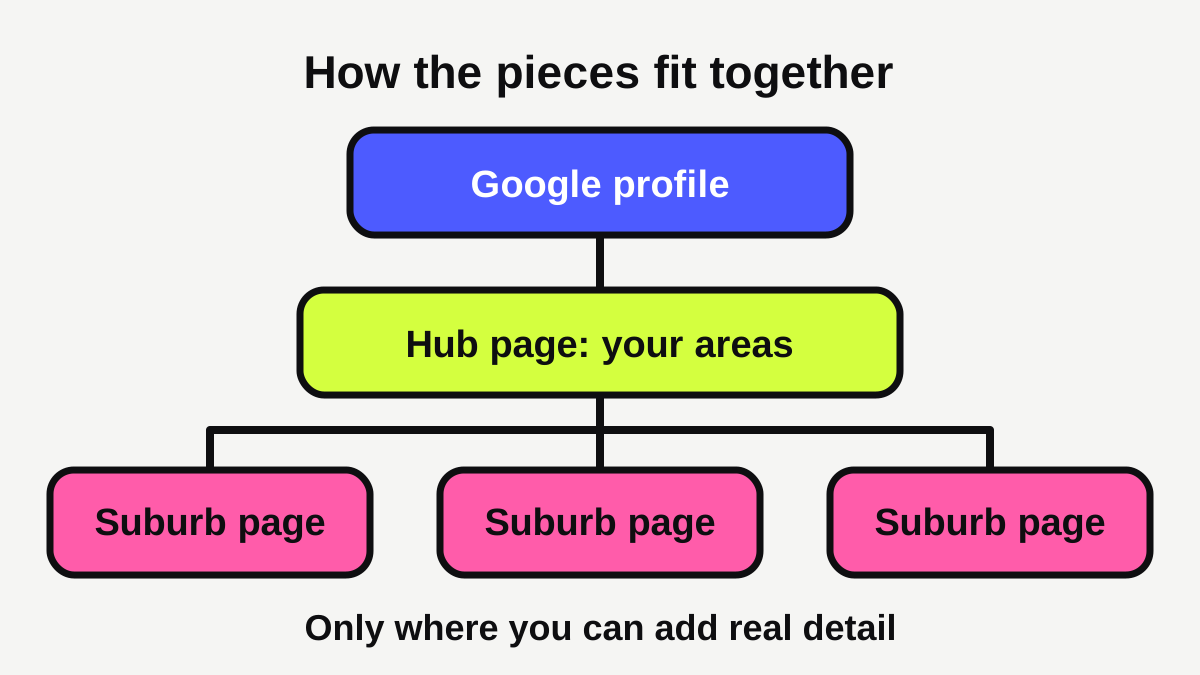
Think of it as three layers:
- One Google Business Profile for your base, with your service areas listed.
- One hub page on your website listing the areas you cover.
- A few suburb pages for the places where you do the most work.
If you haven't set up the first layer, start with our Google Business Profile checklist.
Do service area pages help you rank in Google Maps and search?
They can help with one of the three factors, and they can't touch another. Google says local results are mainly based on relevance, distance and prominence [5]. Relevance is how well a profile matches what someone is searching for, distance is how far each business is from the customer searching, and prominence is how well known a business is [5].
A good suburb page helps relevance on your website. It shows Google, and the customer, that you work in that area. It doesn't change distance. A customer standing next to a competitor is closer to them than to you, and no page fixes that. Google also says there is no way to request or pay for a better local ranking [5].
So set your expectations honestly. Suburb pages give you a chance to be found for searches in the areas around you. They don't guarantee first place in every suburb. Our guide on how to rank in Google Maps for your suburb covers the profile side in more depth.
What does Google say is spam?
Two parts of Google's spam policies matter here.
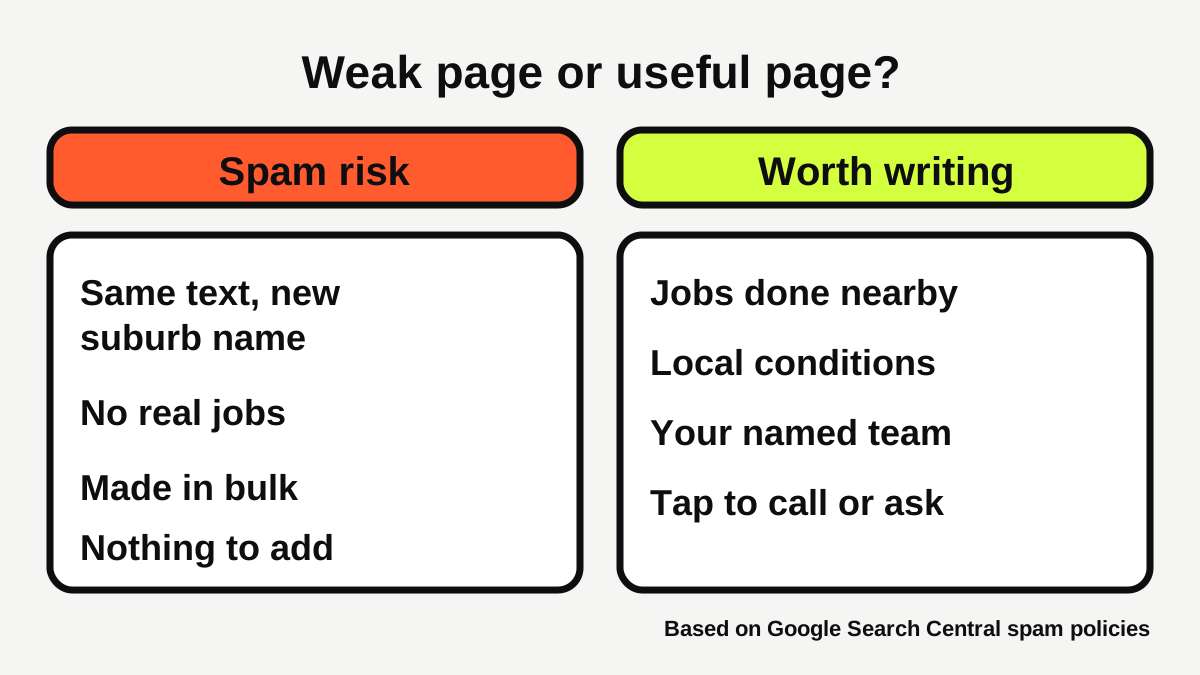
Doorway abuse. Google defines this as sites or pages created to rank for specific, similar search queries [1]. Its examples include "having multiple domain names or pages targeted at specific regions or cities that funnel users to one page" and "creating substantially similar pages that are closer to search results than a clearly defined, browseable hierarchy" [1].
Scaled content abuse. Google describes this as many pages generated for the primary purpose of manipulating search rankings and not helping users [1]. It says this applies "no matter how it's created", and its examples include using generative AI tools to generate many pages without adding value for users [1]. Google's separate guidance on AI content says the same: generating many pages with these tools without adding value for users may violate its spam policies [8].
That does not mean you can't have a page for each suburb. It means a page has to exist for a reason other than ranking. Google's own questions for checking this are useful: is the content primarily made to attract visits from search engines, and are you producing lots of content in hope some of it performs well [2]?
What should a good service area page include?
Google's helpful content guidance asks whether someone will leave feeling they've learned enough to achieve their goal, and had a satisfying experience [2]. For a suburb page, that means answering what a customer in that suburb wants to know.
What real details can you add?
Add things that are true for that area and that a copy-paste page couldn't contain:
- Jobs you have done there. A short description of a recent job, with a real photo, if the customer agrees. Never invent jobs, and never use someone's name or address without asking.
- Local conditions. Older houses, strata buildings, flood or hail damage, council rules, parking, access. Only include what you actually know from the work.
- How you serve the area. Where your team is based, typical arrival windows, and whether you charge a call-out fee for that distance.
- Who will turn up. Names and photos of your team, and your licence number where your trade needs one.
- A clear next step. A tappable phone number and a short enquiry form. Our guide to what makes a local business website get enquiries explains how to set this up.
How should the page be built?
Google's SEO starter guide says a good title is unique to the page, clear and concise, and accurately describes the contents [6]. So each suburb page needs its own title, not the same one with a name changed in a template. It also suggests including words in the URL that are useful to users [6], so /areas/northcote is better than a string of numbers.
Links matter too. Google says links are a great way to connect users and search engines to other parts of your site, and that most new pages it finds are discovered through links [6]. So link your suburb pages from your hub page, and link each suburb page back to the matching service page. Our guide to what pages a tradie website needs shows where these fit.
How many suburb pages should you make?
Fewer than you think. A rough test is whether you could fill the page with real content without repeating yourself. If you can't, that suburb doesn't need a page.
| Your situation | A sensible plan |
|---|---|
| New business, few jobs yet | One hub page listing areas. Add a suburb page only after a few jobs there. |
| Busy in 3 to 5 suburbs | A page for each, with real jobs and photos. |
| Covering 20 or more suburbs | Pages for your top few. List the rest on the hub page and in your profile. |
| Mostly one suburb | Make your main service pages strong. Skip suburb pages. |
Google lets you list up to 20 service areas on a profile, by city, postal code or another area, but not as a radius around your business [3]. Google also says the overall area should stay within about two hours of driving from your base [3]. That list is a good starting point for deciding where pages might be worth writing. Pick the places you actually want more work.
What about addresses, other profiles and virtual offices?
These shortcuts get businesses into trouble, and they have nothing to do with web pages.
- No extra profiles for other suburbs. Google says there should only be one profile per business [4].
- No fake or virtual offices. Google says a P.O. box or a mailbox at a remote location is not acceptable as an address, and a virtual office is not eligible for a profile [4].
- No redirecting links. Google's guidelines say not to provide phone numbers or URLs that redirect or refer users to landing pages [4]. Your profile website should represent your individual business location [4].
If you serve customers at their home, follow the service-area rules in our Google Business Profile checklist and keep your home address hidden.
Should you use structured data on these pages?
It is optional, and it is a finishing touch, not the main event. Google's LocalBusiness documentation says to define each local business location as a LocalBusiness type, using the most specific sub-type possible [7]. That documentation is about a business's physical locations. It also says Google does not guarantee that features that use structured data will show up in search results [7].
So, if you or your web person add it, make sure the details match your profile exactly. But don't expect it to rescue thin pages. Content comes first.
What are the common mistakes?
- Making a page for every suburb in the city. Most will be thin, and thin pages are the pattern Google warns about [1].
- Using one template with the suburb name swapped. Google's examples of doorway abuse include substantially similar pages [1].
- Having AI write 50 pages in an afternoon. Generating many pages without adding value for users may violate Google's policies [8]. AI can help you draft a page you then fill with real details, but it can't know your jobs.
- Claiming areas you don't serve. Beyond the ranking risk, customers will call and you will have to turn them down. Keep the list honest.
- Forgetting to link the pages. A page nothing links to is hard to find [6].
- Never checking. Look at which pages get calls and enquiries, and improve or remove the ones that don't.
What to do next
- List your five busiest suburbs, using your invoices or job list.
- Check your Google profile has one entry for your base, and your service areas set (up to 20, no radius) [3].
- Write a hub page that lists the areas you cover and links to your service pages.
- Write one proper suburb page for your best area: real jobs, local details, your team, a clear way to call.
- Give it a unique title and a clear URL [6].
- Wait a few weeks, see what enquiries it brings, then write the next one.
A free Omniwink scan shows how your site and profile look to a customer, and the website cost calculator gives a rough idea of what extra pages cost. Plumbers can see what customers expect on our plumbers page, and electricians on our electricians page. If you'd like help building pages that are worth reading, our websites service covers it.
Ready for a website that brings in work?
Fixed prices, a private preview, and the balance only when you're happy.
Sources
- [1]Spam Policies for Google Web Search · Google Search Central · accessed 25 October 2026
- [2]Creating helpful, reliable, people-first content · Google Search Central · accessed 25 October 2026
- [3]Manage your service areas for service-area & hybrid businesses · Google Business Profile Help · accessed 25 October 2026
- [4]Guidelines for representing your business on Google · Google Business Profile Help · accessed 25 October 2026
- [5]Tips to improve your local ranking on Google · Google Business Profile Help · accessed 25 October 2026
- [6]SEO Starter Guide: The Basics · Google Search Central · accessed 25 October 2026
- [7]Local Business (LocalBusiness) Structured Data · Google Search Central · accessed 25 October 2026
- [8]Google Search's Guidance on Generative AI Content on Your Website · Google Search Central · accessed 25 October 2026