What makes a local business website get enquiries?
A local business website gets enquiries when visitors can see what you do, trust you and contact you in seconds, on a phone. Here is how to fix each step.
By the Omniwink team · 15 October 2026 · 9 min read
Listen to the summary· 1 min

A local business website gets enquiries when a visitor can see what you do, where you do it and how to contact you within a few seconds, on a phone. Most websites that never produce a call are not failing because of colours or fonts. They are missing one of those answers, or making the next step slow or awkward.
This is what marketers call "conversion": turning a visitor into an enquiry. For a local business, it is simple to measure, because an enquiry is a call, a form or a message. This guide walks through the steps a visitor takes, and the fix for each one where they most often drop out.
What does "website conversion" mean for a local business?
Conversion is the share of visitors who do the thing you want, such as ringing you or asking for a quote. If 200 people visit and 6 get in touch, that is a 3 per cent conversion rate. You do not need the percentage to make progress. You need to know whether the number of calls and forms is going up.
Your visitors usually arrive in one of three ways: a Google search, your Google Business Profile, or a link from social media or a friend. They arrive with a job in mind, often on a phone, and often in a hurry. The site has to answer the main questions at once, so they do not go back to the search results.
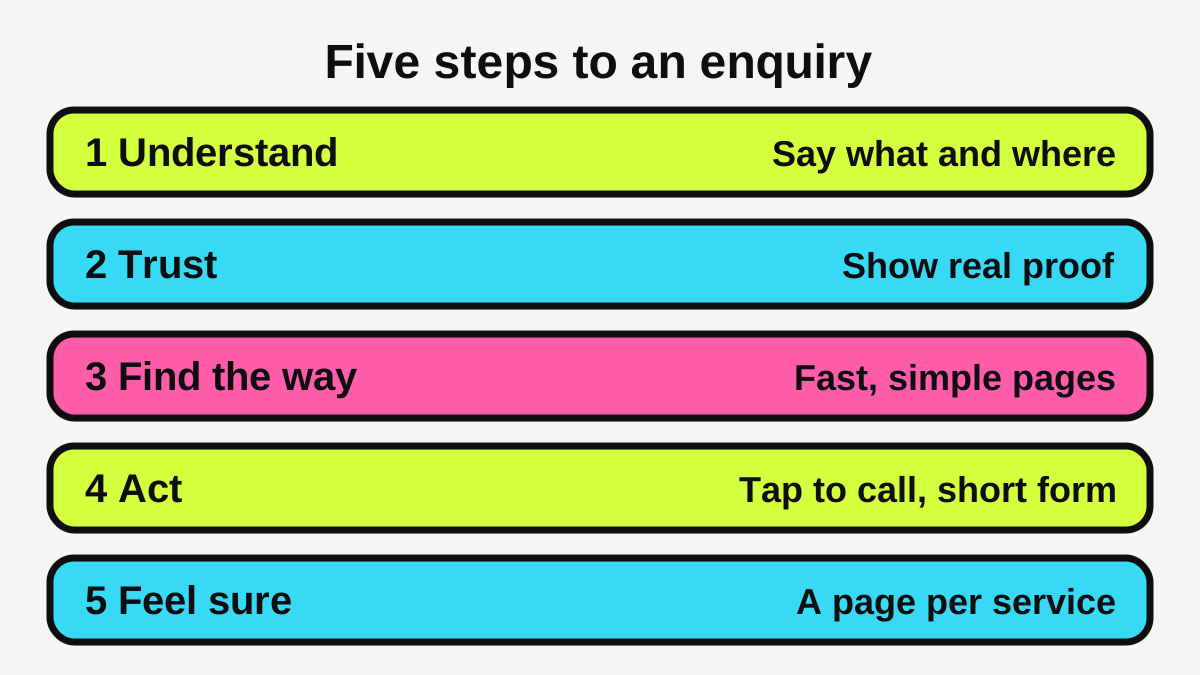
Think of the site as a path with five steps. Fix the weakest step first, because improving a strong step does little.
Can people tell what you do in five seconds?
The top of your home page does the most work. A visitor should be able to read it and know the trade, the place and what to do next. The Australian Government's website guidance says to put the most important information first and to include contact details or a contact form [1].
Compare these two headlines:
- "Excellence in every detail" (says nothing about the job)
- "Plumber in Geelong: blocked drains, hot water and leaks. Call now" (says what, where and the next step)
The second one is also closer to the words people type into Google. Google's guide to search notes that people who are new to a topic often search differently to experts, so write the way your customers talk [3].
What goes at the top of the page?
- A headline saying what you do and where.
- One line on who it is for or what makes you different, in plain terms.
- A phone number that can be tapped on a mobile.
- One clear button, such as "Get a quote".
- One real photo of you or your work, not a stock image of handshakes.
If your site has an image slider with six messages, replace it with one clear message. A page that tries to say everything often says nothing.
Is your website fast enough on a phone?
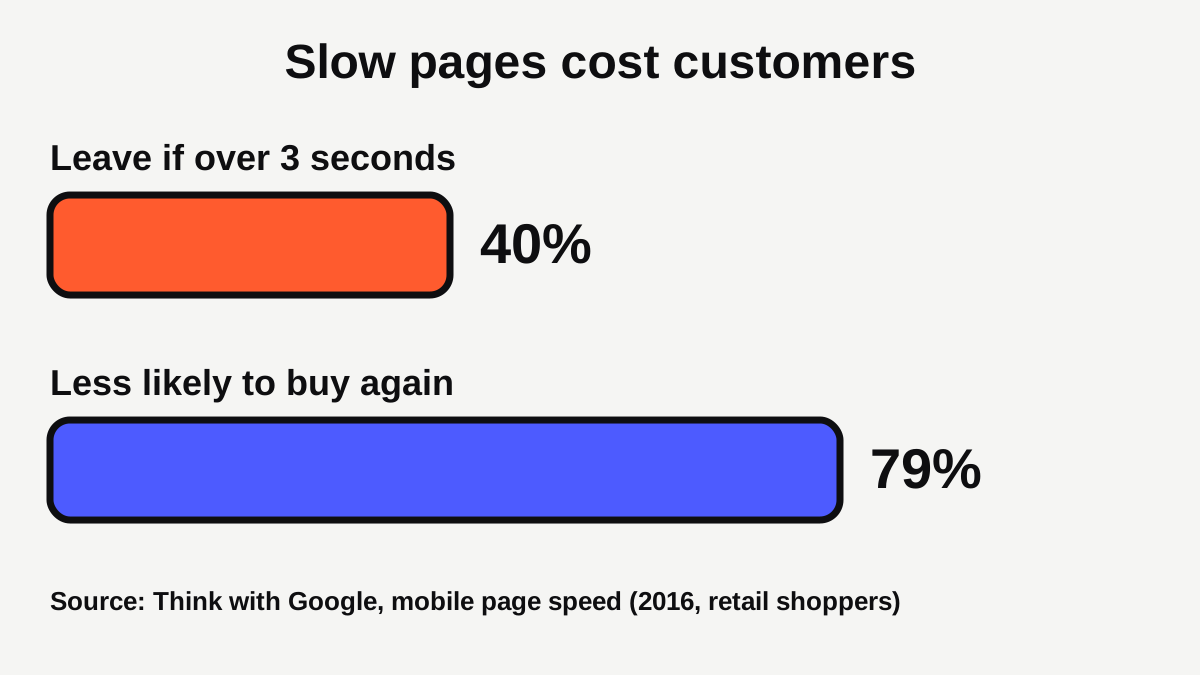
Speed is part of conversion, because slow pages lose people before they read a word. In Google's own article on mobile speed, 40 per cent of consumers leave a page that takes longer than three seconds to load, and 79 per cent of shoppers unhappy with a site's speed say they are less likely to buy from it again [4]. Those figures come from retail shoppers and a 2016 report, so treat them as a guide to the direction, not a promise for your trade [4].
Google's Core Web Vitals give clear targets, measured for most visitors (the 75th percentile of page loads). A "good" site shows its main content within 2.5 seconds, responds to taps within 200 milliseconds and keeps layout shift at 0.1 or less [2]. Layout shift is when a page jumps as it loads and you tap the wrong thing.
For a step-by-step method to test and fix this, read our guide to small business website speed. The usual quick wins are smaller photos, fewer add-on scripts and a decent hosting plan.
Can visitors contact you in one tap?
This is the most common leak on local sites. A customer who has decided to call should not have to hunt for your number, copy it and paste it into their phone.
Make the phone number work
Turn your number into a tap-to-call link, and show it at the top of every page, not only on the contact page. If you take calls on the road, think about whether a missed call gets a quick reply, which is a topic we cover in our automation work at Omniwink automations and in our guide to what missed call text back is and whether it is worth it, and our guide on how fast to reply to a new lead covers the reply itself.
Keep the same number, name and website everywhere. Google's Business Profile rules say the phone number should connect to your specific business, and that the name should match the one customers see on signage, websites and stationery [7].
Keep the form short
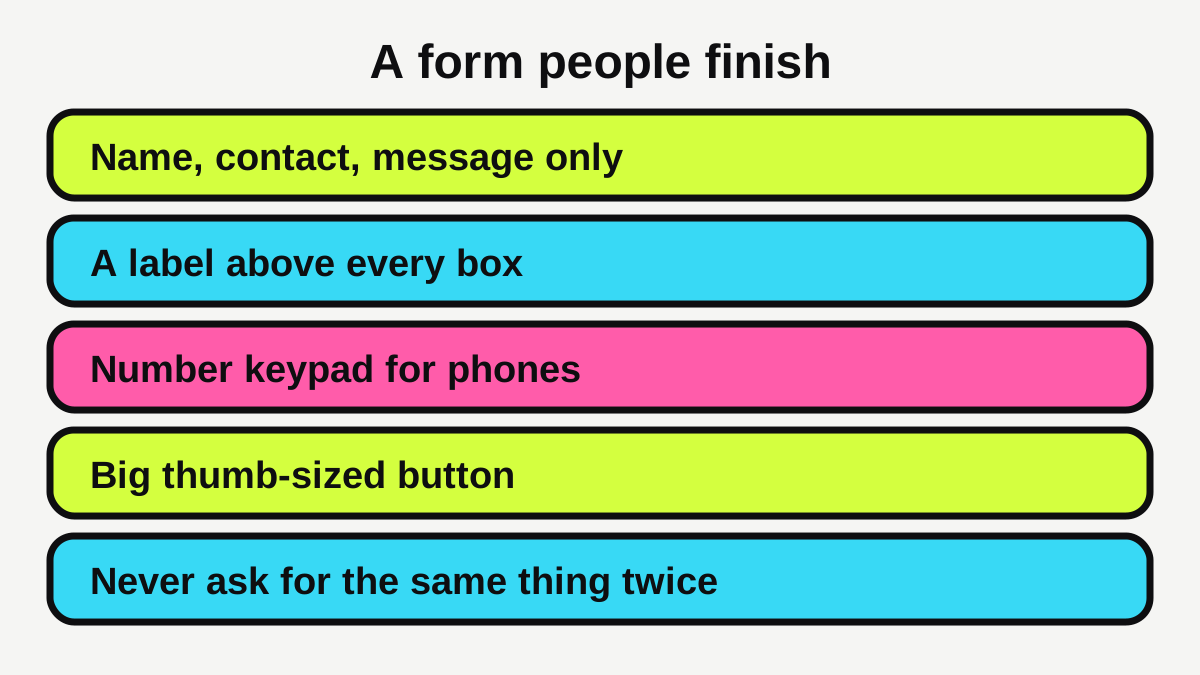
A form is for the people who would rather not ring. Google's form guidance is written for sign-in forms, but its lessons carry over to enquiry forms [5]:
- Use a visible label above every box, not just placeholder text that vanishes when someone types [5].
- Use the right field type, so a phone box brings up a number keypad and an email box brings up an email keyboard [5].
- Make buttons and boxes big enough for a thumb, with the W3C suggesting at least 44 by 44 CSS pixels [5].
- Do not make people type the same thing twice, because that increases abandonment [5].
- Only collect extra information when the person clearly benefits [5].
For most local businesses, name, phone or email, and a short message is plenty. You can ask about the job once you are talking.
Does your site give people a reason to trust you?
Customers are handing over money, and often access to their home or health. Trust signals reduce the risk they feel. Good ones are specific and real:
| Trust signal | What to show | Where to put it |
|---|---|---|
| Licence and registration | Your licence number and name, as your state or regulator requires | Footer and about page |
| Reviews | Genuine reviews from real customers, with names where they agree | Home page and service pages |
| Photos | Your own finished jobs, your team and your vehicle | Near the contact button |
| Guarantees | What you will actually do, in plain words | Service pages |
| Contact details | A local phone number and the area you cover | Every page |
Do not fake any of it. Invented reviews or stock photos presented as your work backfire as soon as a customer notices. If you need more reviews, our free Google review link tool makes it easy to ask for them, and our guide to how to get more Google reviews covers the rules on asking.
The Australian Government also lists accessibility and cyber security as basics: design your site so people with disability can use it, and use strong passwords and two-factor authentication [1]. A site that works for everyone, and has not been hacked, is more trustworthy.
Does each service have a page that answers the question?
A home page cannot hold every answer. Someone searching for "switchboard upgrade" wants a page about switchboard upgrades. Google's guidance asks whether someone reading your content will "leave feeling they've learned enough about a topic to help achieve their goal", and warns about content that leaves readers needing to search again elsewhere [6].
For each main service, write a page that covers:
- What the job is and when people need it.
- What happens from first call to finished work.
- How you price it, or what changes the price.
- What you need from the customer.
- A clear next step.
Google also says that useful content shows first-hand expertise [6]. That is your advantage as a local business: you do this work every day. Write what you would tell a customer on the phone. Our guide on what pages a tradie website needs covers the full set of pages, and the same thinking works for clinics, salons and cafes.
What are the common mistakes that cost enquiries?
| Mistake | Why it loses enquiries | Fix |
|---|---|---|
| Phone number is plain text | Mobile visitors must copy it | Make it a tap-to-call link |
| Vague headline | Visitors cannot tell what you do | Say the job and the place |
| Long form with many boxes | People give up | Ask only what you need to reply |
| Stock photos only | Feels generic and less trustworthy | Use your own work |
| Slow, heavy pages | People leave before reading | Compress images, test on mobile |
| One page for everything | Searchers cannot find their job | One page per main service |
| No sign of who you are | Trust is low | Add an about page with a photo |
How do you find out whether changes work?
You do not need complex software. Pick a method and stick to it:
- Count for a month. Write down every call, form and message that came from the website.
- Ask new customers how they found you.
- Change one thing at a time, such as the headline or the form, so you know what caused any difference.
- Count again for another month.
Our free website scan is a quick way to spot basic problems with speed, mobile layout and contact details before you start. The website cost calculator can help you decide whether to fix the current site or build a new one, and our guide to how much a small business website costs explains the options.
What should you do next?
Work through this list in order. Most of it takes an afternoon.
- Open your site on your phone. Can you tell what you do, and where, within five seconds?
- Add a tap-to-call number to the top of every page.
- Cut your contact form to the fields you need to reply, with labels above each box.
- Replace stock photos with your own work where you can.
- Check your licence details and reviews are visible and genuine.
- Test your speed and fix the biggest photos first.
- Add a page for each of your three main services.
- Start a monthly tally of calls and forms.
If you would like a hand, our websites service builds sites around these steps, and our plumbers and electricians pages show how the same ideas apply to specific trades.
Quick summary
- Enquiries come from a path: understand, trust, find the way, act, feel confident.
- Say what you do and where at the top, in plain words.
- Make the site quick and tap-to-call on a phone.
- Keep forms short, labelled and thumb-friendly.
- Show real proof, never invented proof.
- One page per main service, then measure with a monthly tally.
Ready for a website that brings in work?
Fixed prices, a private preview, and the balance only when you're happy.
Sources
- [1]Set up a business website · business.gov.au (Australian Government) · accessed 15 October 2026
- [2]Web Vitals · web.dev (Google) · accessed 15 October 2026
- [3]SEO Starter Guide: The Basics · Google Search Central · accessed 15 October 2026
- [4]Why marketers should care about mobile page speed · Think with Google · accessed 15 October 2026
- [5]Sign-in form best practices · web.dev (Google) · accessed 15 October 2026
- [6]Creating helpful, reliable, people-first content · Google Search Central · accessed 15 October 2026
- [7]Guidelines for representing your business on Google · Google Business Profile Help · accessed 15 October 2026