AI receptionist cost in Australia: what you'll really pay
What an AI receptionist costs in Australia, from about 28 cents a minute to a few hundred dollars a month, plus what to check before you switch one on.
By the Omniwink team · 4 November 2026 · 10 min read
Listen to the summary· 2 min

An AI receptionist is software that answers your business phone, talks to the caller, and then takes a message, answers simple questions or books a job. In Australia, the AI receptionist cost we found on provider pages ranges from about 27.5 cents a minute [2] to 95 cents a minute [3], or from about $62 a month for a plan that includes 100 minutes [1]. Most small businesses will land somewhere between $50 and a few hundred dollars a month.
Whether it is worth it depends on how many calls you miss and what a new customer is worth to you. This guide shows the real pricing we found, a worked example, what a human receptionist costs by comparison, and the privacy checks to do before you switch one on. These are prices that providers published when we looked, so treat them as a guide and get a written quote.
How much does an AI receptionist cost in Australia?
There are two common ways providers charge: by the minute, or by a monthly plan with minutes included. Here is what three providers published on their own pages.
| Provider | What it charges | Notes |
|---|---|---|
| Siptalk | 27.5 cents a minute | No setup fees, no contract, no minimum monthly spend, all features included [2] |
| RingCentral | From $62 a month | Includes 100 minutes of call handling; extra minute bundles can be bought [1] |
| Waboom AI | 95 cents a minute pay as you go, 78 cents on the Starter plan, 73 cents on the Growth plan | Pay as you go has a $130 monthly platform fee; plans are bought as upfront credit [3] |
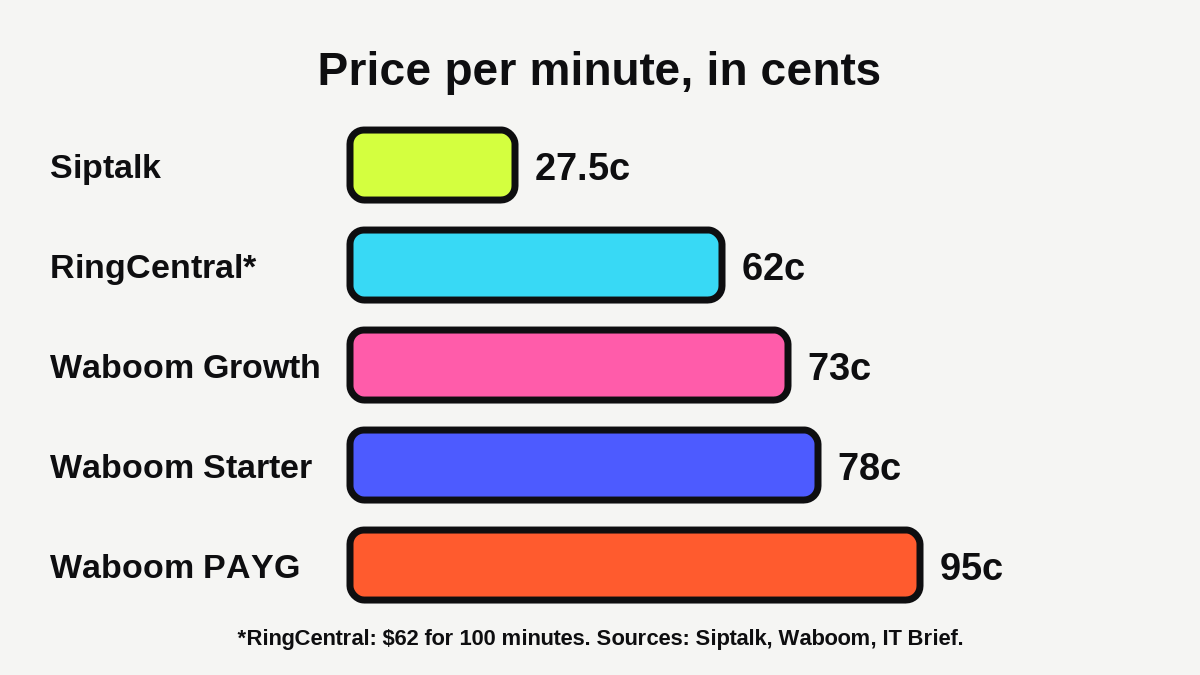
A few honest cautions. These three are examples, not a ranking, and we have not tested them. The RingCentral figure is a monthly price, so we worked out the 62 cents a minute in the chart by dividing $62 by 100 minutes, which only holds if you use every minute [1]. The pages we read did not all say whether prices include GST, so ask [2][3]. And prices change, so check the provider's page on the day you decide.
What else can push the price up?
The headline rate is rarely the whole bill. Ask about:
- Platform or monthly fees on top of the per-minute rate (Waboom's pay as you go option lists one) [3].
- Setup or onboarding fees. Siptalk says it charges none, but not every provider says so [2].
- Extra minutes once your included allowance runs out. RingCentral says extra bundles can be bought, but its launch article does not give their price [1].
- Lock-in. Some plans have no contract and some have minimum terms. Waboom says each voice agent plan has a 30 day money-back guarantee [3].
- Custom builds. A tailored setup for your trade, with your price list and booking rules, usually costs more than a generic one. Ask for the price in writing.
What will it cost you each month? A worked example
Work from your own call log. Say your business gets 25 calls a week and the average call lasts two minutes. That is 50 minutes a week, or about 216 minutes a month (50 x 52 / 12).
| Option | Rough monthly cost for 216 minutes | How we worked it out |
|---|---|---|
| Siptalk | About $59 | 216 x $0.275 [2] |
| Waboom Starter | About $168 | 216 x $0.78 [3] |
| Waboom pay as you go | About $335 | 216 x $0.95, plus $130 platform fee [3] |
| RingCentral | $62 for the first 100 minutes, extra bundles on top | Extra bundle price not published in the article we read [1] |
This is simple arithmetic on published rates, not a quote, and it ignores GST and any other fees. The point is the shape of it: for a business with a modest call volume, the gap between the cheapest and dearest options is large, and the platform fee matters more than the per-minute rate when your volume is low.
If you run a busy practice with 100 calls a week, the same sums give you around 870 minutes a month, so a flat plan with a big allowance may be better than paying by the minute. Run both numbers for your own business before you choose.
Is an AI receptionist cheaper than hiring a person?
Usually, yes, but they are not doing the same job. A person can greet someone at the counter, handle an upset customer with judgement and do the filing. An AI receptionist answers calls.
On pay alone, the Clerks Private Sector Award lists a Level 1 adult rate of $26.97 an hour from the first full pay period on or after 1 July 2026, or $33.71 an hour for a casual, which includes the 25% casual loading [7]. For a 38 hour week at $26.97, that is about $1,025 a week, or around $4,440 a month, before super, leave and other costs (26.97 x 38 x 52 / 12). That page says to confirm rates against the current Fair Work pay guide, so do that before you plan a hire [7].
A part-time or casual person for a few hours of phone cover a week costs much less than that full-time figure, so the sensible comparison is the hours you actually need covered, not a full-time wage.
Where does AI beat a person, and where doesn't it?
- AI is better at answering every call at once, answering after hours, and giving the same answer every time.
- A person is better at upset or confusing calls, safety or urgent judgement, and anything that needs an exception or a favour.
- Many businesses split it: the AI answers first, takes the details, and passes urgent or sensitive calls to a person.
If you already forward unanswered calls to your phone, our guide to missed call text back covers a simpler, cheaper step that texts the caller back instead of answering for you.
Is it worth paying for? The case for answering faster
People who ring a local business usually want help now. A Zoho survey reported by IT Brief found that 22% of Australians expect instant responses, 37% expect a reply within 30 minutes, and a further 13% anticipate one within 30 to 60 minutes [6]. The article describes those as general customer expectations that extend to small businesses, not figures for small business customers alone, and it dates from October 2024, so treat it as a guide [6].
The sums are simple. If you miss five calls a week, and one of those would have been a $400 job, the answer to "is it worth $60 a month" is probably yes. If you rarely miss a call, it is probably not. Our guide to how fast to reply to a new lead sets out reply targets for every kind of enquiry, and the answer applies to phone calls too.
Which businesses get the most from one?
It helps most where hands are busy and calls come at odd times:
- Plumbers, electricians and other tradies on site all day.
- Dentists, physios and clinics where the front desk is tied up with patients.
- Salons and cleaners who cannot answer mid-appointment.
If you are in a health field, keep the AI to admin tasks such as bookings and messages. It should not give clinical advice or promise outcomes, and you should follow the advertising rules that apply to your profession.
What privacy rules apply to AI call answering?
An AI receptionist hears customers' names, numbers, addresses and sometimes sensitive details. This is general information, not legal advice, so check with a professional if you are unsure.
Is a call recording personal information?
Often, yes. The OAIC says a recording of a call which contains an individual's voice may be that individual's personal information, particularly when the person can be identified, such as when the recording sits in or is linked to a customer file [5]. That means the recordings, transcripts and call summaries your AI tool stores are things you are responsible for looking after.
What does the OAIC say about using commercial AI tools?
The OAIC's guidance on commercially available AI products makes several points that apply to a business using a call-answering tool [4]:
- Tell people it is AI. Public facing AI tools, such as chatbots, should be clearly identified as AI, and people should be made aware they are interacting with an AI system rather than a human [4]. The guidance is written about chatbots, and the same sense applies to a voice tool, so put it in your greeting.
- Update your privacy policy. The guidance says to give clear and transparent information about your use of AI, in your privacy policy and collection notices [4]. If you run a health or finance business, see our guide to using AI in a regulated business for the extra rules.
- Check the vendor's terms. Some products may collect customer inputs for further training, which can be a privacy risk, and you can turn off features that disclose data to third parties where the product allows it [4]. Ask where the recordings are stored. RingCentral says its tool stores local call data as a privacy and security measure, which is the kind of detail to ask every provider for [1].
- Collect only what you need. Collect personal information that is reasonably necessary for your functions or activities, and use it only for purposes the customer would reasonably expect [4].
- Test it and keep a person in charge. The guidance warns that AI systems are known to produce inaccurate or false results, so test before you deploy, and use human oversight and ongoing monitoring [4]. It also says due diligence should not be a "set and forget" exercise [4].
- Ask whether you need it at all. The OAIC says products should not be used simply because they are available [4].
What about recording the call itself?
Rules about recording phone conversations are set by law, and they differ across states and territories. We did not find a single plain-English government page to cite for this, so ask your provider how it handles recording, say clearly in the greeting if calls are recorded, and take advice for your state before you rely on recordings.
How do you choose and test an AI receptionist?
Start narrow. The best first job is taking messages and booking, not answering every possible question.
Questions to ask a provider
- What is the total monthly cost for my expected minutes, including GST, platform fees and setup?
- What happens when I use more minutes than my plan includes?
- Where are recordings and transcripts stored, and can I delete them?
- Can it transfer a call to my mobile, and how does it decide when to?
- Does it connect to my booking system or CRM, or just email me a message?
- Is there a contract, or a trial period?
How do you test it?
Ring it yourself, from a different phone, at least ten times. Ask the awkward questions: a price you have not given it, a suburb you do not cover, an emergency. Listen for wrong answers and for anything it makes up. Fix the script, then test again. Check the call summaries daily for the first few weeks.
What to do next
- Count your missed calls and total phone minutes for one normal week.
- Multiply by 52 and divide by 12 to estimate your monthly minutes.
- Ask two providers for a written quote for those minutes, including GST, fees and contract terms.
- Check where recordings go, and update your privacy policy and greeting to say callers may be talking to AI [4].
- Test it with at least ten real calls before it answers a customer.
- Review after a month: calls answered, jobs booked, wrong answers, and the bill.
If you would like help setting one up as part of a wider follow-up system, see our automations service and our pricing. You can also run a free website scan to see how customers find you in the first place.
Hand the admin to an AI employee.
Custom automations for the jobs that eat your week, quoted before we start.
Sources
- [1]RingCentral launches AI Receptionist in Australia from AUD $62 · IT Brief Australia · accessed 4 November 2026
- [2]AI Receptionist - 24/7 Intelligent Call Answering Service - Siptalk · Siptalk · accessed 4 November 2026
- [3]Virtual Receptionist Australia | AI, 24/7 | Waboom AI · Waboom AI · accessed 4 November 2026
- [4]Guidance on privacy and the use of commercially available AI products · Office of the Australian Information Commissioner (OAIC) · accessed 4 November 2026
- [5]What is personal information? · Office of the Australian Information Commissioner (OAIC) · accessed 4 November 2026
- [6]Zoho study reveals rising customer service expectations in Australia · IT Brief Australia · accessed 4 November 2026
- [7]Clerks Award pay rates 2026/27 (MA000002) + free PDF · RosterElf · accessed 4 November 2026