Using AI in a regulated business in Australia: what to know
Can a health or finance business use AI in Australia? Yes, with limits. What the privacy, AHPRA and ASIC guidance says, and a safe way to start.
By the Omniwink team · 7 November 2026 · 9 min read
Listen to the summary· 2 min

If you run a clinic, a financial practice or any business with a regulator watching over it, here is the short answer. Yes, you can use AI in a regulated business in Australia. But the rules you already follow still apply to every tool you switch on, and the privacy regulator's advice is to avoid putting personal information, especially sensitive information, into public generative AI tools [1].
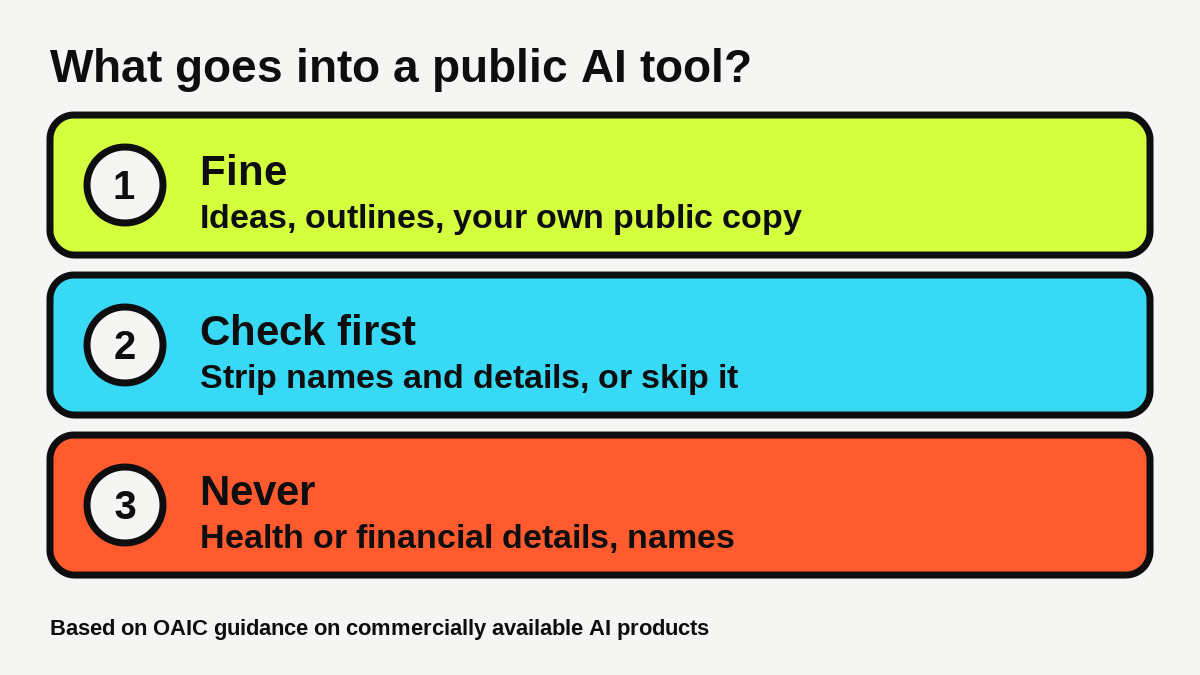
That one rule covers most of the risk for a small practice. Use AI for work that involves no client details, such as a draft social post, a blog outline or a quote template. Keep client information out of free, public chatbots. Before any tool touches client data, find out where that data goes. You stay responsible for the result either way.
This guide is general information, not legal, financial or clinical advice. It explains what the Australian regulators have actually published, so you can ask better questions of your tools, your insurer and your adviser.
Do the privacy rules apply to a small regulated business?
Often yes, and for health businesses always. A small business is one with an annual turnover of $3 million or less, and many small businesses are outside the Privacy Act. But the OAIC says that, regardless of turnover, the Act covers any business that is a health service provider [4]. The same page lists other categories that are covered whatever their size, including businesses that trade in personal information and Commonwealth contractors [4].
So a small clinic that provides health services is covered however small it is. A small cafe usually is not. If you are not sure which side you fall on, check the OAIC's small business page [4] before you assume you are exempt.
Even if you are exempt, your clients may not know that. Many professions also have their own duties of confidentiality, so "the Privacy Act does not apply to me" is rarely the end of the question.
What does the privacy regulator say about AI tools?
The OAIC published guidance on commercially available AI products in October 2024 [1]. For a small business, these are the points that matter.
- Do not paste personal information into public tools. The OAIC recommends that organisations do not enter personal information, and particularly sensitive information, into publicly available generative AI tools, and describes the risks as significant and complex [1]. Entering personal information into a public chatbot is a disclosure, so the rules on use and disclosure (APP 6) apply [1].
- Health information needs extra care. The OAIC says AI in healthcare may pose particular privacy risks because of how sensitive health information is [1].
- Consent has to be real. Generating or collecting sensitive information usually requires consent, and the OAIC says consent cannot be implied merely because someone was told about a proposed collection [1].
- AI makes mistakes. AI systems can produce false results, and generative AI carries a higher risk of this. The OAIC says outputs should be recorded as probabilistic assessments, not facts, with human oversight [1].
- Do your homework on the product. Check whether it has been tested for your use, what data it was trained on and who can access what you enter. The OAIC says this due diligence should not be a "set and forget" approach [1].
- Say so in your privacy policy. The OAIC says to update privacy policies and notices with clear and transparent information about your use of AI [1]. Public-facing tools such as chatbots should be clearly identified as AI [1].
- Train your staff. Staff should know what the product does with information, its limits, and what they may and may not use it for. The OAIC warns that staff may overestimate a tool's accuracy if oversight and training lapse [1].
If your tool is a phone assistant or chatbot that talks to the public, our guide to AI receptionist costs and privacy goes through what to check before you switch one on.
What does Ahpra expect from health practitioners using AI?
Ahpra's guidance, which applies the National Boards' existing codes of conduct to AI, has a clear starting point: the practitioner remains responsible for delivering safe and quality care, whatever technology is used [2]. Human judgment must be applied to everything the AI produces [2].
The rest of the guidance follows from that.
Understand the tool
Ahpra says to review the product information, including its intended use and limitations, and to know how patient data is used to retrain the AI and where it is stored [2]. Approval by the Therapeutic Goods Administration (TGA) does not remove your duty to oversee the tool [2].
Tell patients, and get consent where needed
Ahpra says practitioners should inform patients and clients about their use of AI [2]. How much detail you give depends on the use: diagnostic imaging software needs less explanation than a tool that records a consultation [2]. When AI needs personal data, get informed consent, and ideally record the patient's response in the health record [2].
Check AI scribes with extra care
Ahpra says scribing tools that use generative AI generally involve personal data, so they typically need patient consent, and the practitioner is responsible for checking the accuracy and relevance of the records the tool creates [2]. Ahpra also notes that some AI tools are regulated by the TGA where they have a therapeutic use and meet the definition of a medical device, and you can check the Australian Register of Therapeutic Goods or ask the vendor [2].
Check your insurance
Ahpra says to hold professional indemnity insurance that covers all aspects of your practice, and to ask your insurer if you are unsure whether AI tools are covered [2].
What about advertising and marketing content?
AI is most useful in a clinic for marketing: captions, blog drafts, review replies. That is also where health businesses can slip, because the advertising rules do not change just because a machine wrote the words.
Ahpra publishes advertising guidelines, a testimonials resource and an evidence framework for assessing claims [6]. Its main AI page links to those resources rather than relaying their rules [2][6]. Read them directly before you publish anything with a claim about results or patient stories. A chatbot is not a source of evidence for a health claim, so check any claim the tool writes against a real source, and leave patient stories and testimonials to Ahpra's testimonials rules.
Our guide on whether AI-written content is bad for SEO covers the search side. For the review side, see how to reply to a bad Google review without leaking patient details.
What did ASIC find about AI in financial services?
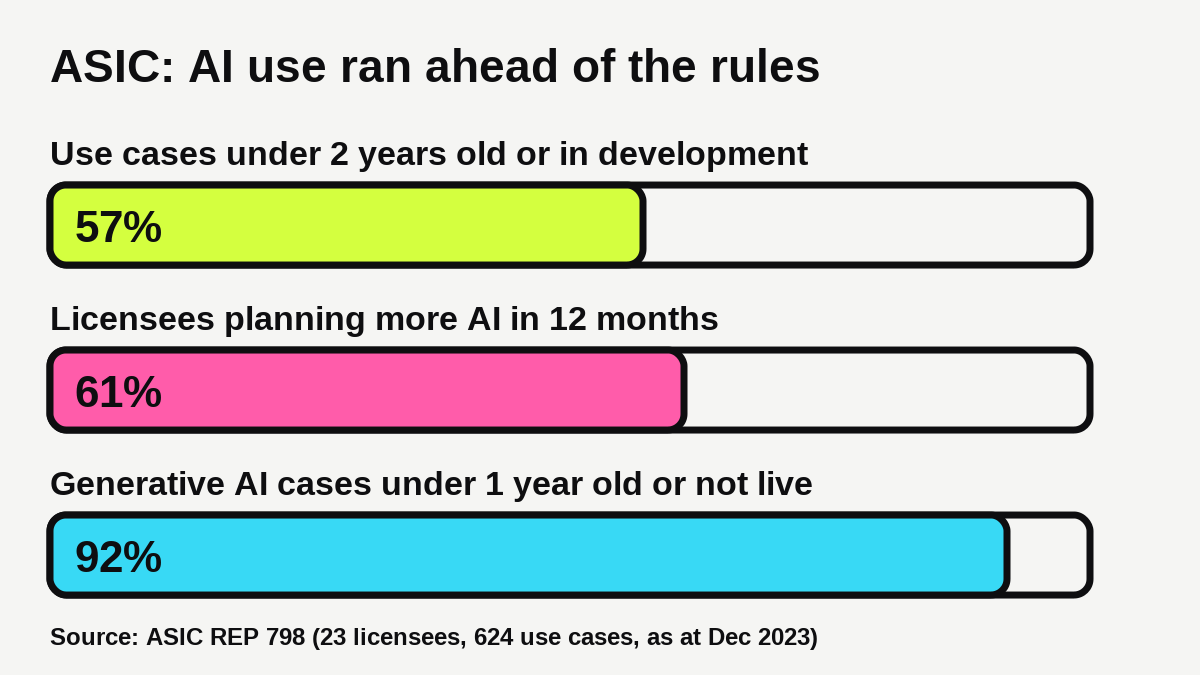
ASIC does not give small advisers and brokers a rulebook for AI, but its 2024 review is worth knowing. It analysed 624 AI use cases from 23 licensees in banking, credit, insurance and financial advice, as at December 2023 [3].
Its main finding was a governance gap. Some licensees were updating their governance arrangements at the same time as increasing their AI use, and in two cases AI governance lagged AI use [3]. ASIC's message was that governance arrangements should lead AI use as it increases and evolves [3].
The numbers show how fast things were moving: 57% of use cases were less than two years old or still in development, and 61% of licensees planned to increase their AI use in the next 12 months [3].
ASIC also found many licensees relied heavily on third parties for their AI models, and not all had appropriate governance arrangements to manage that risk [3]. If you are a mortgage broker, accountant or adviser using an AI tool built by someone else, that is your situation too. You are still the one the client trusts.
Rules vary by licence, so for anything beyond general good practice, ask your licensing body or compliance adviser.
How do you start safely? A simple five-step plan
The Australian Government's Guidance for AI Adoption, released by the National AI Centre, has a Foundations part for businesses new to AI and comes with an AI policy template and an AI register template [5]. You do not need to adopt everything at once. A small business can follow this order.
- List what you already use. Include free chatbots, transcription tools, email add-ons and anything your staff use on their own. An AI register can be a simple table.
- Sort the jobs by risk. Jobs with no client details, such as a social post idea, are low risk. Jobs that involve client names, health details, finances or case notes are high risk.
- Write a one-page rule. Say which tools are approved, and what must never be pasted into a public tool, such as names, contact details, health or financial details [1].
- Check any tool that touches client data. Ask who can access what you enter, whether it is used for training, where it is stored and whether you can opt out [1][2].
- Keep a person in charge. Someone reads every output before it is used, and records when something was AI-generated [1].
| Job | Typical risk | What to do |
|---|---|---|
| Draft a social post or blog outline | Low | Use AI, then check facts and advertising rules yourself |
| Reword your own website copy | Low | Fine, as long as no client details go in |
| Draft a reply to a client email | Medium | Remove names and details first, or avoid public tools |
| Summarise a consultation or meeting | High | Only with a tool you have checked, and with client consent |
| Anything that decides on a person's care, credit or fees | High | Keep a qualified person making the decision |
What if you want to automate follow-up and admin?
Plenty of admin does not need client details in an AI tool at all. A missed call text back or a reminder sent from a booking system can follow fixed rules, with no generative AI at all. A CRM for a small business keeps the details in one controlled place instead of scattered across chat windows.
If you want help choosing what to automate, Omniwink's automations service can map the jobs for a clinic or practice, and the free scan shows how your online presence looks to customers. We also work with dentists, physios, accountants and mortgage brokers. We can show you options, but you and your adviser decide what fits your obligations.
What to do next
- Check whether the Privacy Act covers you, using the OAIC's small business page [4]. If you are a health provider, it does [4].
- Ask staff what AI tools they already use, including free ones on their own phones.
- Write your one-page rule: approved tools, and what never goes into a public one.
- Add a sentence about AI to your privacy policy and patient or client notices [1].
- Read the Ahpra AI page [2] and the OAIC guidance [1] in full, and ask your insurer whether your cover includes AI tools [2].
- Start with one low-risk job, check the results for a month, then decide what to add.
If you would like a hand working out where AI could save you time without touching sensitive information, start with a blueprint and we will go through it together.
Hand the admin to an AI employee.
Custom automations for the jobs that eat your week, quoted before we start.
Sources
- [1]Guidance on privacy and the use of commercially available AI products · Office of the Australian Information Commissioner (OAIC) · accessed 7 November 2026
- [2]Meeting your professional obligations when using Artificial Intelligence in healthcare · Ahpra and the National Boards · accessed 7 November 2026
- [3]REP 798 Beware the gap: Governance arrangements in the face of AI innovation · Australian Securities and Investments Commission (ASIC) · accessed 7 November 2026
- [4]Small business · Office of the Australian Information Commissioner (OAIC) · accessed 7 November 2026
- [5]New guidance helps Australian businesses adopt AI safely and responsibly · business.gov.au · accessed 7 November 2026
- [6]Advertising guidelines and other guidance · Ahpra · accessed 7 November 2026