Can you use ChatGPT for customer emails safely?
Can a small business use ChatGPT for customer emails? Yes, if you keep customer details out, check every line and send it yourself. Here is how.
By the Omniwink team · 8 November 2026 · 10 min read
Listen to the summary· 2 min
Can a small business use ChatGPT for customer emails safely? Yes, with care. Used as a drafting helper, it can save time on routine replies. The safety comes from three habits: keep customers' personal details out of what you paste in, check every fact before you send, and make sure a person reads and sends each message.
Why those three? Australia's privacy regulator recommends that organisations do not enter personal information, and particularly sensitive information, into publicly available AI tools [1]. Government guidance also warns that generative AI can present false or misleading information as fact [3]. This guide explains what the rules say, which emails are low risk and which are not, and a simple routine you can follow today. It is general information, not legal advice.
Is it safe to use ChatGPT for customer emails?
It is safe enough for many jobs, if you control what goes in and what goes out. The tool itself is not the problem. The problem is pasting in the wrong things and sending out unchecked words.
business.gov.au says AI tools can make mistakes, take things out of context and rely on unreliable sources, and that you should weigh the potential harms against the benefits [3]. It adds that a customer-facing chatbot carries more risk than a tool that drafts social media posts [3]. Drafting a reply that you then read and send sits closer to the low-risk end, because a human is the last step.
What is the difference between a draft and an automatic reply?
A draft is text you review. An automatic reply goes to the customer without anyone looking at it. The first is a writing aid. The second is a decision to let the tool speak for your business.
If you want fast, automatic first replies, there are purpose-built options with fixed wording. Our guides on missed call text back and lead response time cover when an instant message helps and what it should say.
What should you never paste into ChatGPT?
Anything that identifies a customer, and anything sensitive. The OAIC calls not entering personal information into public AI tools a best-practice recommendation because of the "significant and complex privacy risks involved" [1]. Its own example treats pasting a customer's details into a public chatbot as a disclosure of that information [1]. It also says organisations must take particular care with sensitive information, which generally requires consent to be handled [1].
The Western Australian Small Business Development Corporation gives a practical rule: before you share any personal details or business information in an AI platform, find out where that information may be stored, processed or shared [5]. It also advises reading the terms of any tool and not agreeing to terms you are not comfortable with [5].
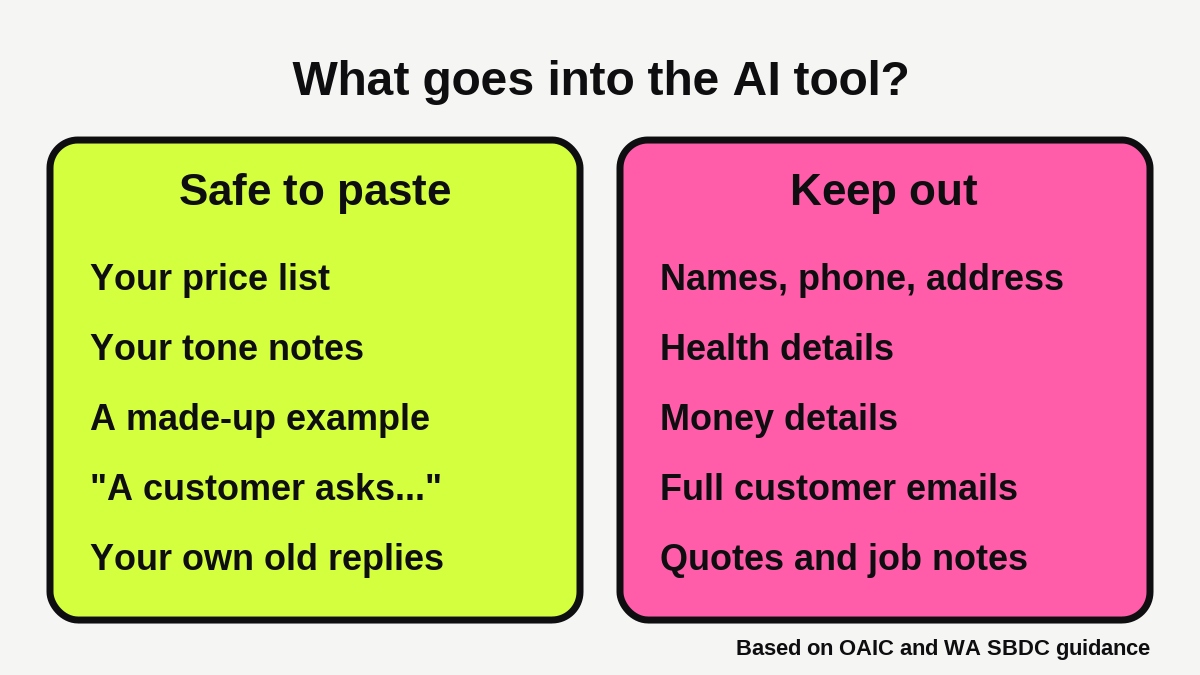
What counts as safe to paste?
| Safe to paste | Keep out |
|---|---|
| Your own price list and service descriptions | Customer names, phone numbers and addresses |
| A made-up example of the customer's question | The customer's actual email, copied in full |
| "A customer asks if we can come Saturday" | Health, financial or other sensitive details |
| Your tone notes, such as "friendly, short, no jargon" | Invoices, quotes or job notes with personal details |
| Your own earlier replies with details removed | Staff or other private business information |
If you do need to reply to a real message, summarise the question in generic words, ask for a draft, then add the name and details yourself in your email program. Our guide on CRMs for small business shows where customer details should live instead.
What about the tool's own settings?
Check them before you rely on the tool. AI tools have terms and data settings that say how your inputs may be stored or used, and these can differ between free, paid and business plans and change over time, so read the current ones for the plan you use. Then rely on the habit that works whatever the settings say: do not put personal details in at all. The WA small business body makes the same point, and suggests keeping up with reliable sources about your chosen platform and looking for trusted reviews [5].
Does the Privacy Act apply to your business?
Possibly not, but do not assume. The OAIC says most small businesses are not covered by the Privacy Act, and that a small business is one with annual turnover of $3 million or less [2]. Turnover includes all income from all sources, but not assets held, capital gains or the proceeds of capital sales [2].
Some businesses are covered whatever their size. The OAIC lists health service providers, businesses trading in personal information, contractors under a Commonwealth contract and operators of a residential tenancy database among them [2]. It also lists businesses that have opted in to be covered, and others related to a covered business [2]. If you run a clinic, physio or dental practice, assume the rules apply to you.
What does that mean for a tradie, salon or cafe?
If you are under the threshold and not in one of those groups, the Privacy Act probably does not bind you. That does not make careless habits a good idea. Customers expect you to keep their details private, and a leak or a wrongly sent message damages trust. The OAIC's AI guidance is aimed at organisations the Act covers, so treat it as a sensible standard rather than a legal checklist if you are exempt [1].
For businesses that are covered, the OAIC says to update privacy policies and notifications with clear information about the use of AI [1]. It also says organisations should set up clear human oversight and verification of AI outputs, particularly where outputs contain personal information [1]. Check the OAIC's small business page, or ask a lawyer, if you are unsure where you stand [2].
What can go wrong with AI-written emails?
The common failures are simple, and all of them are fixable with a read-through.
- Made-up facts. business.gov.au warns that generative AI can "hallucinate", presenting false or misleading information as fact [3]. A draft might invent a warranty, a callout time or a service you do not offer.
- Wrong tone. The WA small business body says output may be irrelevant or inappropriate for your business, industry or audience [5]. A chirpy sales reply to an unhappy customer makes things worse.
- Promises you did not make. The ACCC says businesses cannot make false or misleading claims, and that it makes no difference whether a business intends to mislead or not [4]. It applies the rule to any communication by a business, including written statements and information from staff [4].
- Sounding like a robot. Customers notice generic phrasing. Replies that use their question and your real detail read as human.
Whose mistake is it if the AI gets it wrong?
Yours. The ACCC rule covers what your business says, whoever or whatever wrote the words [4]. If a draft says "we are fully licensed in all states" and you are not, sending it is your claim. Read each line as if you had typed it yourself.
How do you use ChatGPT for customer emails safely?
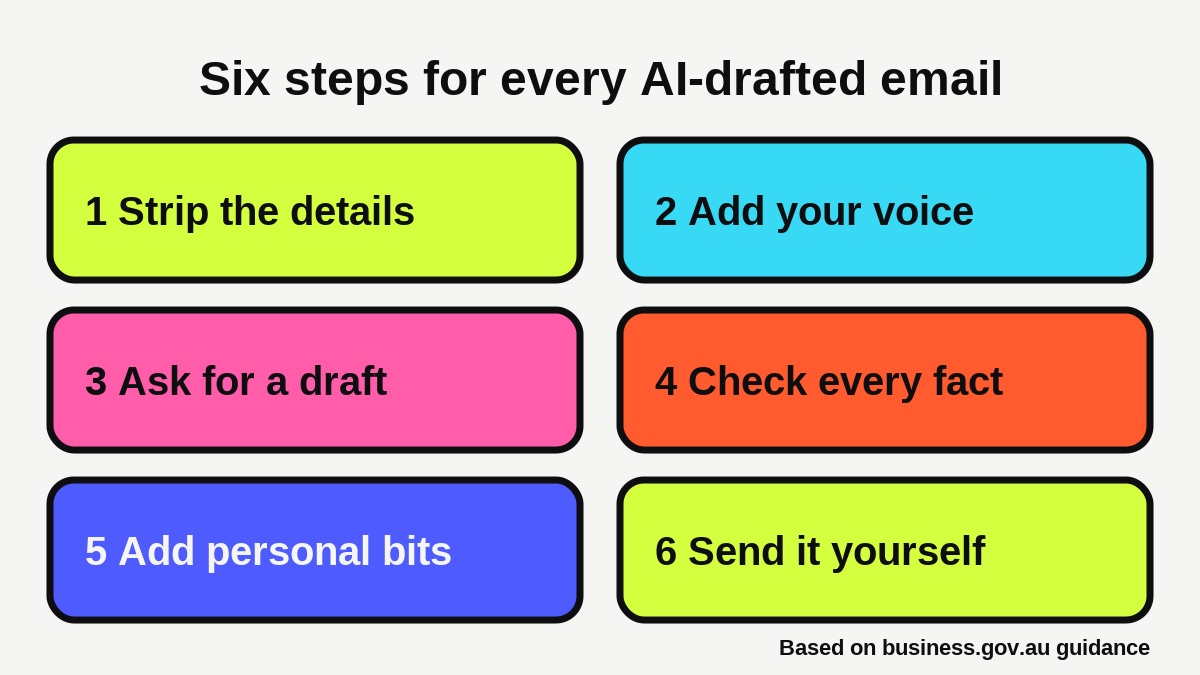
Follow a short routine. It takes a couple of minutes per email once you have done it a few times.
- Strip it. Remove names, contact details, addresses and anything sensitive from what you give the tool.
- Give it your voice. Paste in two or three of your own good replies (with details removed) and ask it to match that tone.
- Ask for a draft, not a final. Tell it the facts to include and not to invent any others.
- Check every fact. Prices, times, areas, licences and promises. Cut anything you cannot back up.
- Add the personal bits yourself. Name, job details and next step, typed into your email program.
- Send it yourself. A person reads it last.
business.gov.au says to check AI-generated content before you use or share it, and to confirm it is accurate, relevant, suitably worded and unbiased [3]. The same page suggests having a clear process to override or stop using a tool if something goes seriously wrong [3].
Which emails are good candidates for AI help?
| Email type | Good fit? | Care needed |
|---|---|---|
| Answering a common question (hours, areas, how it works) | Yes | Check facts against your website |
| Quote follow-ups | Yes | Leave out job and customer details until you add them |
| Thank-you and review requests | Yes | Keep it short and personal |
| Replies to complaints | Partly | Use it for tone only, and write the substance yourself |
| Replies to a bad review | Partly | Draft from the general complaint, never the customer's name |
| Anything about health, money or legal matters | Rarely | Write it yourself, and get advice if unsure |
If you want ideas for what a good reply says, see our guides on following up a quote without being pushy and responding to a bad Google review.
Should you tell customers you use AI?
Be open about it where it matters. business.gov.au says to be transparent with customers about how you use AI, especially when they are talking to an AI rather than a person [3]. The OAIC says public-facing tools such as chatbots should be clearly identified as AI to users [1].
For an email you have drafted with help, read, edited and sent yourself, you are the author, and the main duty is that it is accurate. If you use AI in a way that affects how you handle customers' information, and your business is covered by the Privacy Act, the OAIC says to explain that clearly in your privacy policy and notifications [1].
Do you need an AI policy?
A short one helps, especially if you have staff. business.gov.au suggests an AI policy that covers permitted uses, risk management, privacy, when you tell customers about AI and staff training [3]. It also suggests keeping a register of the AI tools you use and making someone senior accountable [3]. The OAIC likewise says to adopt internal policies that define permitted and prohibited uses and to train staff on the limits of each tool [1].
For a small team, one page is enough: which tool you use, what must never go in, who checks what goes out, and who to ask when unsure.
What to do next
- Write your "never paste" list on one page: names, phone numbers, addresses, health and money details, and anything a customer told you in confidence.
- Check your status. Work out whether your turnover is above $3 million or you fall into a covered group, using the OAIC's small business page [2].
- Read the terms of the tool you use, and note where it says your information may be stored or shared [5].
- Collect two or three of your best replies with details removed, to use as a style guide.
- Pick one type of email (for example, answering common questions) and draft it with AI this week.
- Read, correct and send it yourself. Keep a note of any mistakes the tool made, so you know what to watch for.
If you want routine follow-ups handled in a more controlled way, our automations service sets up replies with wording you approve in advance, and the diagnostic can show where slow replies are costing you work. For a wider look at where AI helps and where it does not, read our guide on whether AI-written content is bad for SEO, or see how this works for plumbers and salons.
Hand the admin to an AI employee.
Custom automations for the jobs that eat your week, quoted before we start.
Sources
- [1]Guidance on privacy and the use of commercially available AI products · Office of the Australian Information Commissioner (OAIC) · accessed 8 November 2026
- [2]Small business · Office of the Australian Information Commissioner (OAIC) · accessed 8 November 2026
- [3]Artificial intelligence (AI) · business.gov.au · accessed 8 November 2026
- [4]False or misleading claims · Australian Competition and Consumer Commission (ACCC) · accessed 8 November 2026
- [5]Artificial intelligence · Small Business Development Corporation (Western Australian Government) · accessed 8 November 2026