CRM for small business in Australia: do you need one?
A CRM keeps customer details, quotes and follow-ups in one place. What it does, when a spreadsheet is enough, what to check on privacy, and how to start.
By the Omniwink team · 19 October 2026 · 9 min read
Listen to the summary· 2 min

What is a CRM? A CRM (customer relationship management) system is a tool that keeps your customers' details, conversations and follow-ups in one place. Business.gov.au describes it as something that collects and manages your interactions with, and information about, customers, suppliers and other businesses [1]. Think of it as a shared notebook that remembers every enquiry, quote and job for you.
Does a small business need one? Not always. If you have a modest list of regular customers and nothing is slipping through the cracks, a simple spreadsheet is a fair start. A CRM becomes worth it when quotes get lost, customer history lives in people's heads, or several people need the same list. This guide shows how to tell which side you are on, what to check on privacy, and how to start without wasting money. If you want a CRM for small business in Australia, the right choice is usually the simplest one you will actually use.
What does a CRM actually do?
A CRM does a small number of jobs. Business.gov.au says a CRM can record contact information and customer feedback, track customer behaviour and purchases, and keep a history of your interactions with customers [1]. It also says that history helps you build more personal relationships, identify and follow up prospective customers, send personalised messages to different customer groups, and measure how well your marketing performs [1].
In plain terms, a CRM answers four questions:
- Who is this person? Name, phone, email, suburb.
- What have we said and done? Calls, quotes, jobs, notes.
- What happens next? A reminder to call back or send a quote.
- Where do my customers come from? Google, referrals, social media.
It is not a marketing miracle. It will not find you customers by itself. It stops the customers you already have from being forgotten.
Is it the same as a customer database?
A customer database is a list. A CRM is a list that also reminds you what to do. If you currently keep a list but never look at it, a new tool will not fix that. The habit matters more than the software.
Do you need a CRM, or is a spreadsheet enough?
For many local businesses, a spreadsheet or the contacts app on your phone is enough at first. It is free, you already know how to use it, and it keeps your options open. Be honest about how it is working, though.
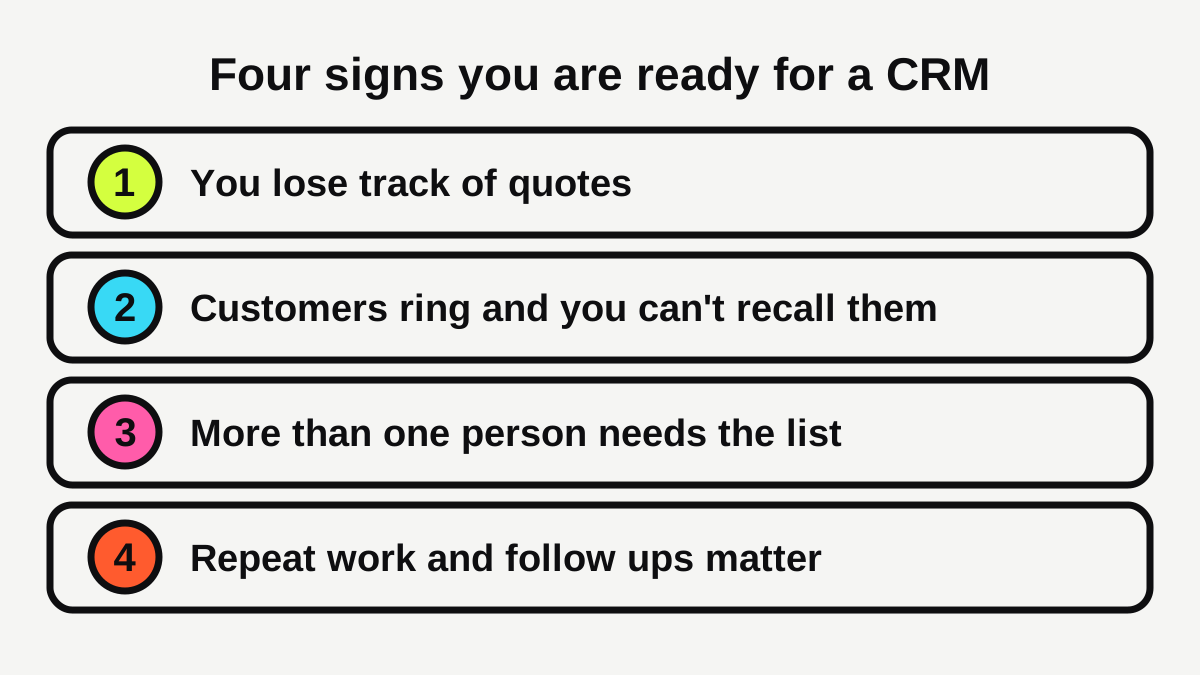
| Situation | A spreadsheet is probably fine | Think about a CRM |
|---|---|---|
| Customers | A modest list of regulars | Hundreds of contacts, and growing |
| Quotes | You remember every one | Some go quiet and are forgotten |
| People | Just you | Two or more people use the same list |
| Follow-up | You rarely need to chase | Reminders would win you real work |
| Reporting | You know where jobs come from | You cannot tell what marketing works |
What about the leads you already lose?
If your problem is slow replies, a CRM is only part of the answer. Our guide to how fast to reply to a new lead covers the first reply, and how to follow up a quote without being pushy covers what to say after. A CRM simply helps you do both on time. If calls are what you miss, see what missed call text back is.
Can too many tools hurt?
Yes. A Salesforce small-business page, which comes from a CRM vendor and so should be read with that in mind, reports that 53% of small and medium business leaders struggle with inconsistent data across their tools and that the average small or medium business uses seven business applications [6]. Business.gov.au gives similar advice: review what you already use, cancel subscriptions you don't need and check for tools that overlap [2]. A CRM that duplicates what your invoicing app already does can create work instead of saving it.
What does a CRM cost, and what should you check first?
Prices vary widely, so work from what you need, not from the longest feature list. Business.gov.au says some CRMs have flexible cost structures such as pay-as-you-go or tiered pricing for cloud-based systems, and suggests looking for free plans or open-source software that meet your needs [2].
Before you sign up, ask:
- What is the total monthly price? Include extra users, text messages and any set-up fee.
- Can I export everything? You should be able to take your records with you.
- Does it work on my phone? If you are on site all day, it has to.
- Does it connect to what I already use? Your email, calendar and accounting app are the usual ones.
- Where is the data kept, and who can see it? More on that below.
Is cloud software common among small businesses?
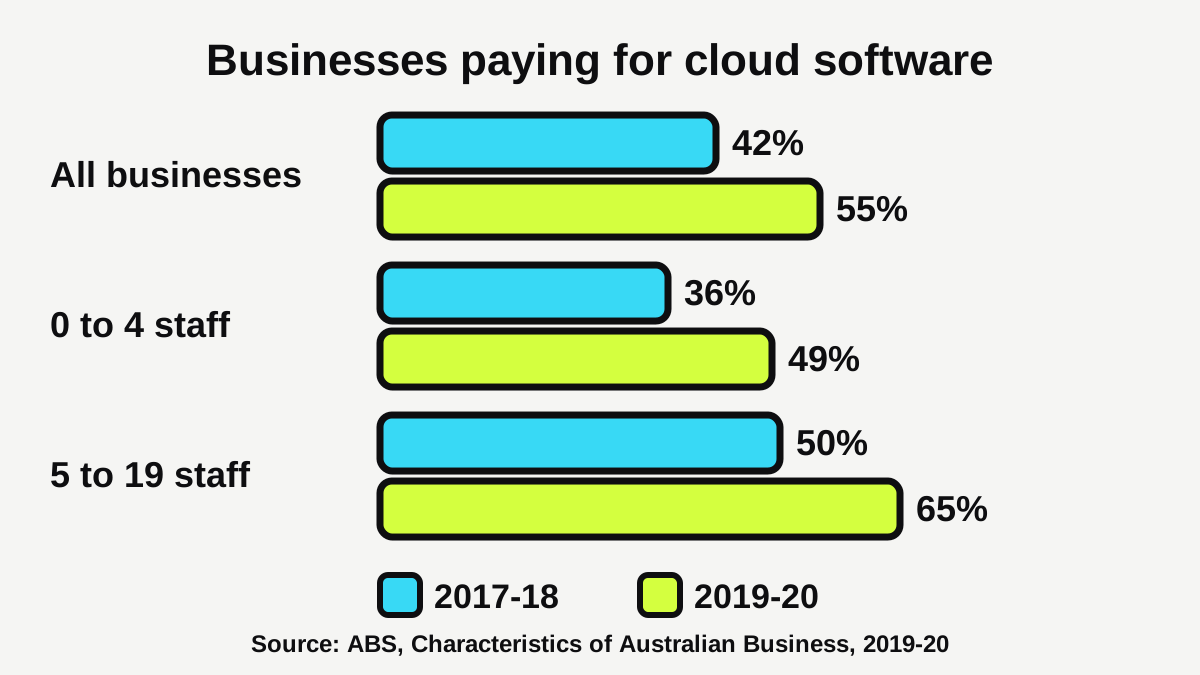
Yes, and growing. The ABS found that 49% of businesses with 0 to 4 staff and 65% of businesses with 5 to 19 staff paid for cloud computing services in 2019-20, up from 36% and 50% in 2017-18 [5]. Across all businesses it rose from 42% to 55% [5]. The ABS describes cloud computing as IT services used over the internet to access software, computing power or storage capacity [5]. Most modern CRMs are cloud tools, so you would be in good company. These figures are a few years old, so treat them as a guide to the trend, not today's exact numbers.
Do privacy laws apply to the customer details you store?
A CRM holds personal information, so privacy matters. This is general information, not legal advice.
The OAIC says a small business is one with an annual turnover of $3 million or less [3]. Many small businesses fall outside the Privacy Act for that reason, but not all. The OAIC lists categories that are covered whatever their turnover, including health service providers and businesses that trade in personal information, as well as those that choose to opt in [3]. Business Queensland adds that businesses at or under $3 million are exempt from some parts of the legislation but still have other privacy obligations, and that it recommends all businesses follow privacy legislation voluntarily to build customer trust [4].
Business.gov.au is blunt about it: information you store about customers needs to follow privacy laws [1]. Business Queensland points to the OAIC's small business checklist to work out your obligations [4]. If you run a clinic, check that checklist, because health information is the kind of thing that can pull you under the Act [3].
What are sensible habits?
- Collect only what you need. You rarely need a birth date for a plumbing quote.
- Tell people what you will do with their details.
- Limit who can see the list, and remove staff who leave.
- Use a strong, unique password and switch on two-step sign-in where it is offered. A vendor survey reports that 84% of small and medium business leaders are confident they can keep data secure, but fewer than half have measures like two-factor authentication in place [6].
- Marketing texts and emails have their own rules. We cover opt-outs and consent in our guide to missed call text back.
How do you start with a CRM without it becoming a chore?
Small and simple wins. The goal is a tool you open every day, not a perfect setup.
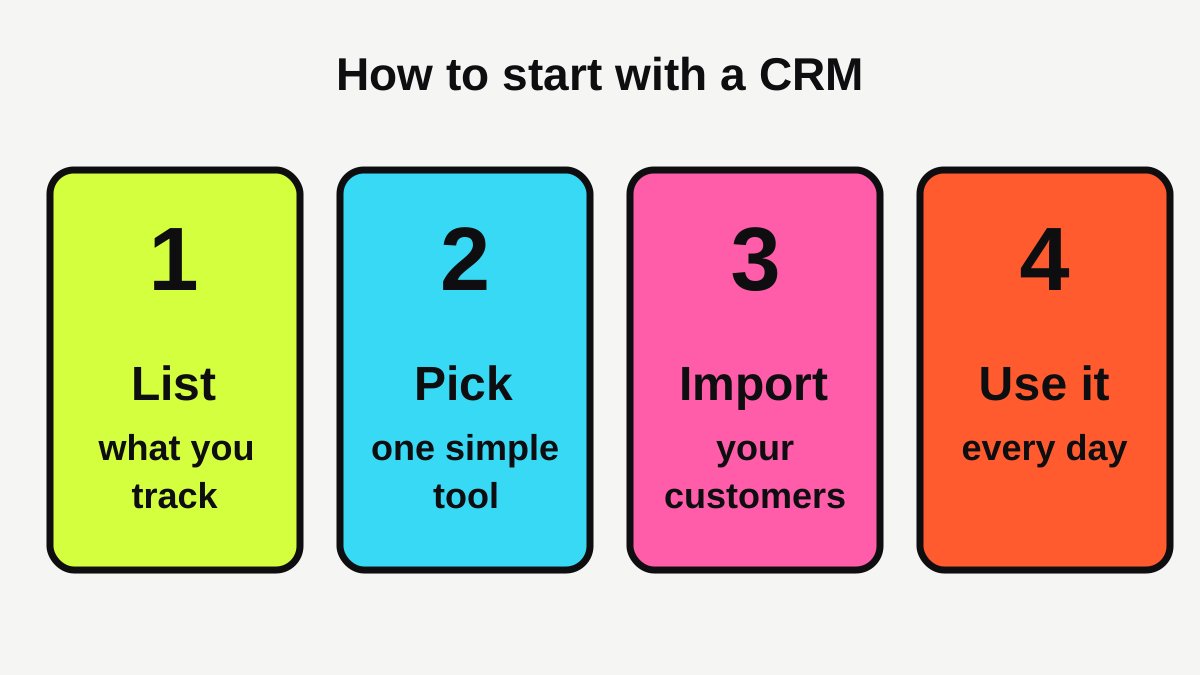
- List what you track. Contact details, source of the enquiry, quote amount, next step. Four or five fields is plenty.
- Pick one simple tool. Try a free plan if one suits you [2]. Avoid paying for features you won't use.
- Import your customers. Clean your spreadsheet first, then import a few rows as a test.
- Use it every day. Log each call and quote when it happens, and set a reminder for the next step.
Which industries get the most from it?
Trades and service businesses that quote on every job, such as electricians, builders and landscapers, usually see the benefit first, because the value is in follow-up. Appointment businesses like salons and physios tend to need booking software first, with a CRM-style list built in.
Where does a website fit in?
Your website is often where new records come from. If forms send enquiries straight into your list, nothing gets retyped or lost. Our guide to what makes a local business website get enquiries covers making forms easy to use, and our automations service can connect forms, replies and reminders if you would rather not wire it up yourself.
What should you put in it, and what should you leave out?
Keep the records short and useful. A good entry has the customer's name and number, how they found you, what they asked for, the quote amount, and the date you will next get in touch. Skip anything you would never act on. The more boxes you ask yourself to fill in after a long day on the tools, the sooner the habit dies, and a half-empty CRM is worse than a spreadsheet you update every day. If a field has not helped you win or keep a job after a couple of months, remove it.
Who should be allowed to see it?
If you have staff, decide who needs access and to what. An apprentice answering the phone may need to read customer notes but not export the whole list. Most tools let you set this up in minutes, and it limits the damage if a login ever goes astray.
What to do next
- Write down how you store customer details now, and where it goes wrong.
- Count the quotes from the last month that you never followed up.
- Try a spreadsheet for a month if you don't have a list yet.
- If you outgrow it, shortlist two tools and check the price, export and phone app.
- Check the OAIC's small business checklist for your privacy obligations [3][4].
- Pick one next step for every customer, every time.
If you want to see how customers find you today, a free website scan is a quick place to look.
Hand the admin to an AI employee.
Custom automations for the jobs that eat your week, quoted before we start.
Sources
- [1]Manage customer relationships · business.gov.au (Australian Government) · accessed 19 October 2026
- [2]Digital tools for business · business.gov.au (Australian Government) · accessed 19 October 2026
- [3]Small business · Office of the Australian Information Commissioner (OAIC) · accessed 19 October 2026
- [4]Protecting privacy and information in your business · Business Queensland (Queensland Government) · accessed 19 October 2026
- [5]Characteristics of Australian Business, 2019-20 financial year · Australian Bureau of Statistics · accessed 19 October 2026
- [6]CRM for Small Business: Choosing the Right Solution · Salesforce Australia · accessed 19 October 2026