Local SEO for tradies: where to start
Local SEO for tradies in plain English: the few things that get your business found by customers nearby, what to fix first, and what to ignore.
By the Omniwink team · 26 October 2026 · 10 min read
Listen to the summary· 2 min

Local SEO for tradies starts with your free Google Business Profile, not your website. Google says it decides local results mainly on three things: how well your profile matches the search, how far you are from the customer, and how well known you are [1]. You can't change the distance, and you can't pay to rank higher [1]. So the work is on the other two.
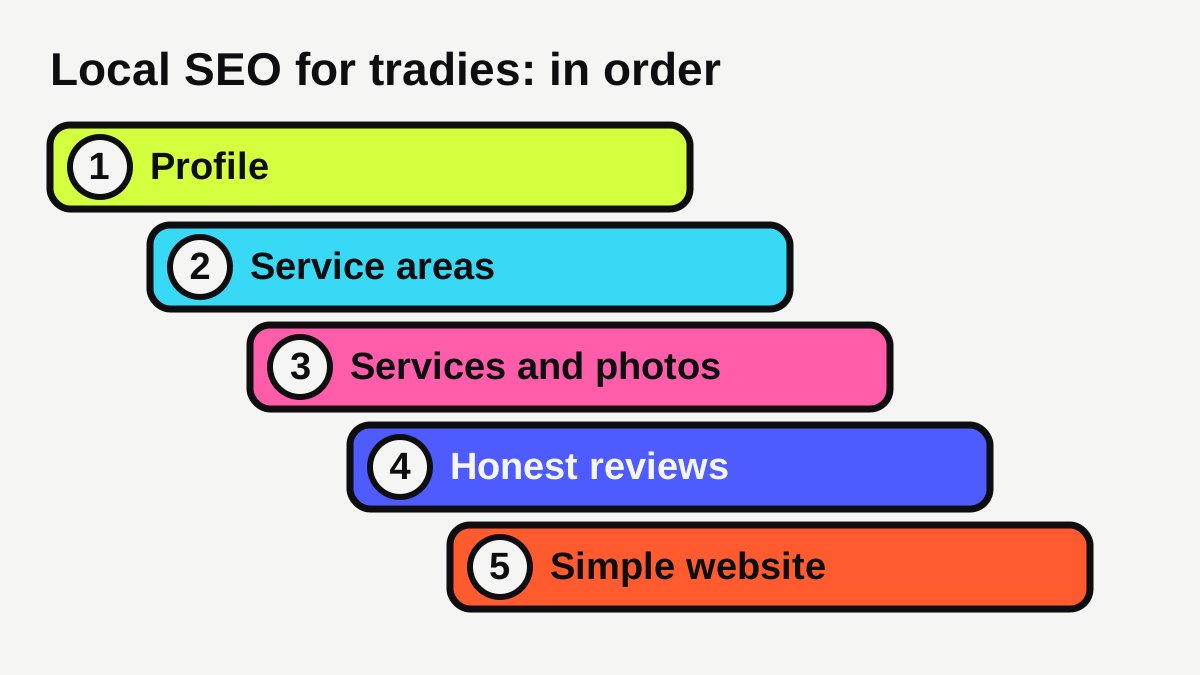
In practice that means five jobs, in this order: set up your profile properly, tell Google which suburbs you serve, add your services and real photos, earn honest reviews, then back it all up with a simple website. This guide takes you through each one and tells you what to skip.
What is local SEO, and why does it matter for a tradie?
SEO means making it easier for search engines to find and understand your business. Local SEO is the part that decides who shows up when someone searches for something like "electrician near me" or "blocked drain" on their phone.
Tradie searches are often urgent. A hot water system fails, a switchboard trips, a tap won't stop. The customer often picks from the first few businesses Google shows. If you aren't in that short list, you don't get the call, however good your work is.
There is no secret that guarantees first place. Google's own starter guide says there are no secrets that will automatically rank your site first [7]. What you can do is make your business easy to understand, accurate and trusted, which is what the rest of this guide covers.
Where should a tradie start with local SEO?
Start with your Google Business Profile. It is free, and it is the listing that appears on Google Maps and in the local results. If you haven't set one up, or you're not sure yours is right, follow our Google Business Profile checklist first. Google says to verify your business and keep your details current and complete [1].
Then check three things that trip up a lot of tradies.
Is your business name correct?
Google says your name should match the real-world name you use on your signage, website and stationery [3]. It says to leave out marketing taglines and service or location details [3]. So "Smith Plumbing" is right, and "Smith Plumbing Best Plumber Camberwell 24 Hour" is not. Stuffing extra words into your name is a quick way to get your profile suspended.
Is your main category specific?
Google's advice is to use as few categories as possible, and make each one as specific as you can [3]. It also says not to use categories as keywords [3]. For most tradies that means one clear main category, such as plumber or electrician, and nothing more unless it truly describes a separate part of your business.
Have you hidden your home address?
If you work from home and travel to customers, you probably shouldn't show your address. Google says that if you don't serve customers at your business address, you should remove it from your profile [2]. Its guidelines use a plumber working from a home address as the example [3]. Show a service area instead.
How do you show Google which suburbs you work in?
Use your profile's service areas. Google's rules are specific [2]:
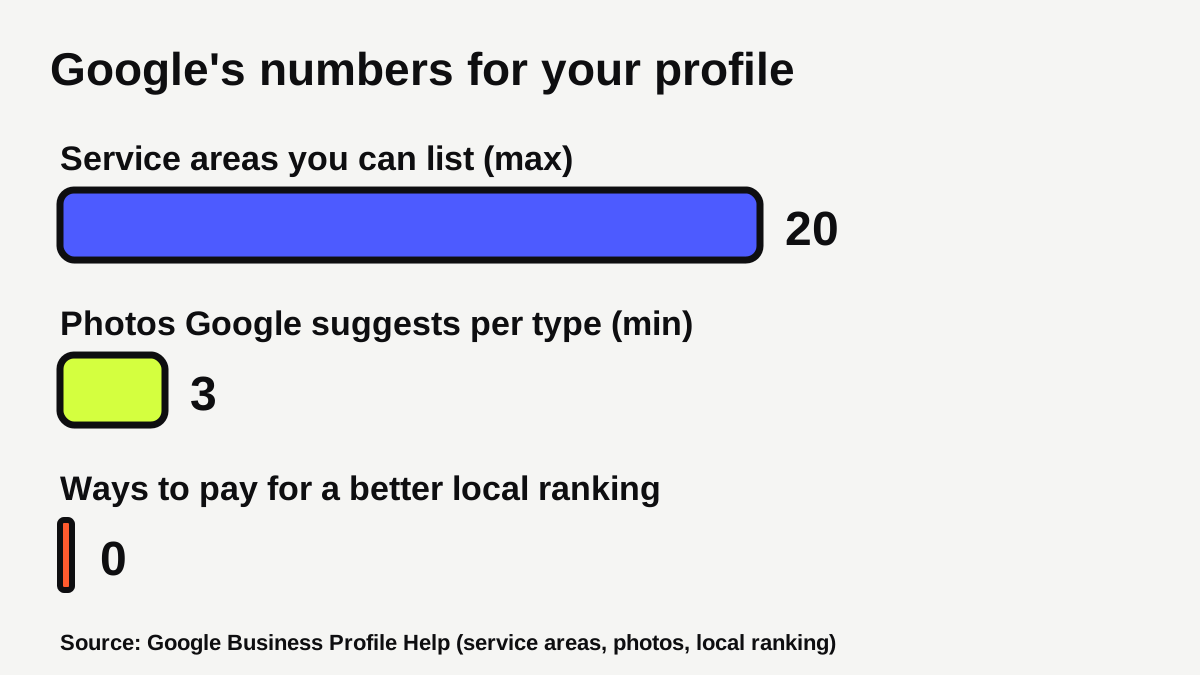
- You can list up to 20 service areas, based on cities, postcodes or other areas.
- You can't set the area as a radius around your business.
- Keep the overall area within roughly 2 hours of driving time from your base.
Pick the suburbs you actually want work in. A profile that lists twenty places you'd happily drive to beats one that claims everywhere.
Don't create a separate profile for every suburb. Google's guidelines say a service-area business should have one profile for its central base, with a designated service area [3]. A separate profile for each suburb, with an invented address, risks suspension.
If you want to rank in suburbs further out, the safe way is a useful page on your own website for each area you genuinely serve. We explain how in our guide to service area pages for suburbs you serve, and how distance limits what's possible in how to rank in Google Maps for your suburb.
What should you add to your profile besides your name and phone number?
Services and photos are where a tradie profile usually has the most room to improve.
Services
Google lets service businesses list their services on their profile, and you can add a description and a price to each [6]. Customers can see the list under "Services" in the Google Maps app, and services may be highlighted when local customers search for them [6]. List the jobs you actually want, such as "blocked drains", "switchboard upgrades" or "bathroom renovations". Google adds that custom services that break its policy are rejected automatically, so keep the names plain, with no phone numbers or personal information [6].
Not every business type gets the option. Google says businesses in certain categories, like service businesses, might be able to showcase their offerings [6].
Photos
Google lists photos and videos among its tips for improving local ranking [1], and gives advice on what to upload [4]. The types most useful to a tradie are:
| Photo type | Google's suggested minimum | What it looks like for a tradie |
|---|---|---|
| Photos at work | 3 | You or your crew on a real job |
| Team | 3 | A relaxed shot of you and the staff |
| Exterior | 3 | Your workshop, office or ute, if customers see them |
| Product | 3 | Finished work, or the fittings you install |
Photos should be sharp and well lit, without "significant alterations or excessive use of filters or AI" [4]. Use JPG or PNG files between 10 KB and 5 MB [4]. Photos only show once your business is verified [4]. Take them on site, with the customer's permission if their home is visible.
How do reviews help a tradie rank, and what are the rules?
Reviews matter twice. Google says the number of reviews and the rating contribute to how well known you are [1], and customers read them before they call.
The rules are strict. Google says rating manipulation, including incentivised or biased reviews, is not allowed and will be removed [5]. It does not allow businesses to "discourage or prohibit negative reviews, or selectively solicit positive reviews" [5]. You may ask for genuine reviews, as long as you don't offer an incentive or try to shape the rating or the wording [5]. So no "$20 off your next job if you leave five stars", and don't only ask the customers who seem happiest.
The simple method is to ask every customer, the same way, soon after the job. Our free Google review link generator makes a link and QR code you can put on an invoice or text. For the full process, see how to get more Google reviews. When a bad one arrives, how to respond to a bad Google review shows what to say.
Google also says responding to reviews shows customers you value their feedback [1]. Reply to each one, briefly and politely.
What does your website need to do for local SEO?
Your profile gets you into the local results. Your website helps customers decide and gives Google more to understand. Google names links from other websites as one input to prominence [1].
Keep the website simple:
- One page per main service. business.gov.au lists descriptions of services, contact details and customer reviews among the pages a business website might have [10]. Someone searching for "blocked drains" should land on a page about blocked drains. Our guide to what pages a tradie website needs lists the core set.
- A clear title on each page. Google says a good title is unique to the page, clear and concise, and accurately describes what is on it, and it suggests including your business name and location where relevant [7].
- Descriptive links. Google says link text should tell people and search engines what the linked page contains [7]. "Hot water repairs" beats "click here".
- A way to call in one tap. business.gov.au says a good site makes it easy to find and contact you, and that it should work on mobile devices as well as desktop [10].
- Your name, phone number and areas identical everywhere. Match your website to your profile so there is no doubt which business is yours.
Google also says its systems aim to reward content made to help people rather than to manipulate rankings [9]. In practice, write what you would tell a customer on the phone: what the job involves, roughly how long it takes, what areas you cover. Real photos from real jobs show first-hand experience, which Google's guidance says to demonstrate [9]. If you want a site built around this, see our websites service and our pages for plumbers, electricians and builders.
What licence details do you need to show?
Rules differ by state and trade, so check your own regulator. As one example, the Queensland Building and Construction Commission says websites, social media pages and vehicle signage all count as advertising [8]. Licensees must include the name they are licensed under, say they are licensed under the QBCC Act and show their licence number, and these details must be easily legible and reasonably prominent [8]. A trading name alone will most likely not comply [8]. The maximum penalty it lists for a licensee is $6,044 for an individual and $30,222 for a company [8].
Other states have their own rules, so look up your licensing body and apply the same idea: put the correct licence details on your website, social pages and vehicle. This is general information, not legal advice.
What should you ignore?
- Anyone promising a guaranteed first spot. Google says there is no way to request or pay for a better local ranking [1].
- Extra profiles and fake addresses. One profile per business base [3].
- Buying, swapping or incentivising reviews. Google prohibits them [5].
- Posting everything everywhere. A complete, accurate profile and a few good pages do more than a pile of thin ones.
- Checking your rank every day. Google says changes can take from hours to months, and suggests waiting a few weeks before judging [7].
How do you check how you're going?
Search your main service plus your suburb, for example "electrician" and the suburb name, on your phone. Note where you appear. Then try it from a spot a few suburbs away. Because distance is part of the ranking [1], results will differ.
Do this once a month and write down what you see. A free Omniwink scan shows how your profile and website look to a customer, and our diagnostic goes deeper if you want a plan.
What to do next
- Search your business and main service on your phone and note where you appear.
- Check your profile name and category against Google's guidelines [3].
- Hide your home address and set up to 20 service areas [2].
- Add your services, with plain names and short descriptions [6].
- Upload real photos of your team at work and finished jobs [4].
- Ask every customer for a review the same way, with no incentives [5].
- Add or tidy one website page for each main service, with your licence details.
- Check again in a month.
If you'd rather hand the lot over, our growth service looks after local search for trade businesses.
How visible is your business?
Get a free visibility score, three fixes and three posts in about a minute.
Sources
- [1]Tips to improve your local ranking on Google · Google Business Profile Help · accessed 26 October 2026
- [2]Manage your service areas for service-area & hybrid businesses · Google Business Profile Help · accessed 26 October 2026
- [3]Guidelines for representing your business on Google · Google Business Profile Help · accessed 26 October 2026
- [4]Tips for business-specific photos on your Business Profile · Google Business Profile Help · accessed 26 October 2026
- [5]Prohibited & restricted content · Google Business Profile Help · accessed 26 October 2026
- [6]Manage your services on your Business Profile · Google Business Profile Help · accessed 26 October 2026
- [7]SEO Starter Guide: The Basics · Google Search Central · accessed 26 October 2026
- [8]Advertising · Queensland Building and Construction Commission · accessed 26 October 2026
- [9]Creating helpful, reliable, people-first content · Google Search Central · accessed 26 October 2026
- [10]Set up a business website · business.gov.au (Australian Government) · accessed 26 October 2026