Instagram ideas for a local business: what to post
Not sure what to post on Instagram for your local business? Here are practical ideas, the best formats for reach and engagement, and a simple weekly routine.
By the Omniwink team · 31 October 2026 · 9 min read
Listen to the summary· 2 min

The easiest answer to "what should I post?" is the work you already do. Show finished jobs, the people on your team, the questions customers keep asking you, and customers' photos when they've said yes. Mix in the odd seasonal reminder or offer. You don't have to invent content, you have to point a phone at your day.
How often matters less than you think. Buffer says three to five Instagram posts a week is likely the sweet spot, and that this pace also helps keep quality high and reduces burnout [3]. Business Queensland says to post content that interests your customers and to avoid hard selling [1].
This guide gives you Instagram ideas for a local business that work in practice, which format suits which job, how to turn one job into a week of posts, and the privacy and permission points to get right. If you're still deciding where to put your effort, see our guide on whether Facebook still works for local businesses.
What should a local business post on Instagram?
Start with five types of post you can repeat. Repeating them is a feature: it makes your page recognisable and takes the "what now?" out of every week. Business Queensland suggests a consistent theme, such as brand colours or a repeated visual element, so people recognise your profile [1].
| Post type | What it looks like | Good for |
|---|---|---|
| The work | Before and after, a finished job, a tidy fit-out, a fresh batch | Showing quality without a sales pitch |
| The people | The owner, a new apprentice, a team member's tip | Trust: customers like knowing who turns up |
| Answers | One question customers ask all the time, answered in 30 seconds | Saving time and being found |
| Customers | A thank you, a photo they tagged, a review you're proud of (with permission) | Social proof |
| The season | A reminder that suits the time of year, a limited offer, a local event | Giving people a reason to act now |
Shopify's advice lines up with this. It recommends high-quality photos, whether you take them or customers do, and says to track which posts perform best and make more like them [2]. Our free social post ideas tool can suggest ideas for your trade if you want a starting list.
Ideas by type of business
These are prompts, not rules:
- Cafes and food: the specials board, a latte pour, the morning rush, a new supplier. See our page for cafes.
- Salons and beauty: a finished style from several angles, a product you use and why, a quick care tip. See our page for salons.
- Gyms and studios: a class timetable, a member milestone (with permission), a form tip. See our page for gyms.
- Tradies: a job in progress, a before and after, a quick "why this keeps happening" explainer.
- Accountants, brokers and agents: a plain-English answer to a common question, a deadline reminder, a local market note. Keep it general. This guide is general information only, and finance and legal posts should not read as personal advice.
- Clinics: educational, general information about your service, not testimonials about treatment or promised outcomes. Check your profession's advertising rules before posting.
Which format works best: Reels, carousels or photos?
All three have a job. Buffer analysed more than 4 million posts sent through its platform between January 2022 and October 2024. Reels got 1.36 times (36 percent) more reach than carousels, and 2.25 times (125 percent) more reach than single-photo posts. Carousels got 1.12 times (12 percent) more engagement than Reels, and 2.14 times (114 percent) more engagement than single-image posts [4].
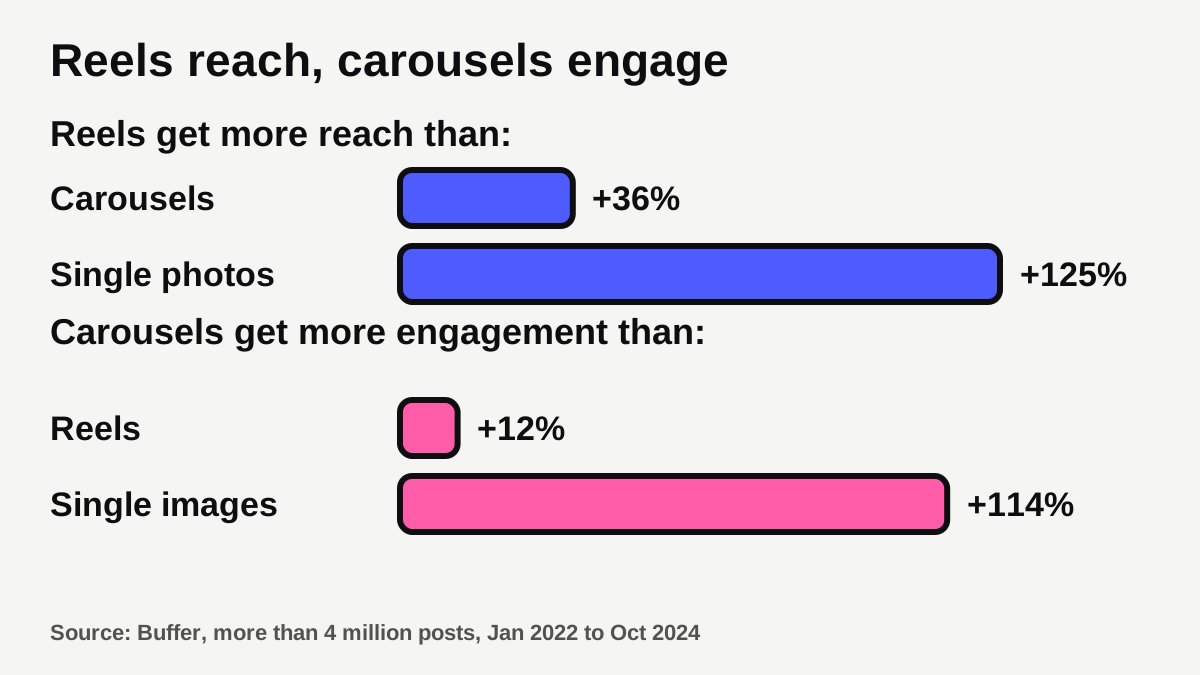
In plain words: Reels help new people find you, and carousels give people a reason to stop, swipe and engage. Single photos still have a place, such as a simple finished-job shot, but they were the weakest of the three in that data [4]. Buffer's article says the figures are "on average" while its chart captions describe medians, so read them as a guide to direction, not an exact prediction for your page [4].
Buffer's own advice is to experiment with different post types for different kinds of content and see what performs best for your account [3]. A few simple matches:
- Reel: a job in motion, a transformation, a quick tip to camera.
- Carousel: a step-by-step, "3 things to check before you book", a before and after with captions on the slides.
- Single photo: a strong finished-job shot or a team portrait.
- Story: the casual stuff (see below).
How do you turn one job into a week of posts?
Shopify's best tip for busy owners is to tell the same story lots of different ways, which is what the top brands do [2]. One job can become several posts.
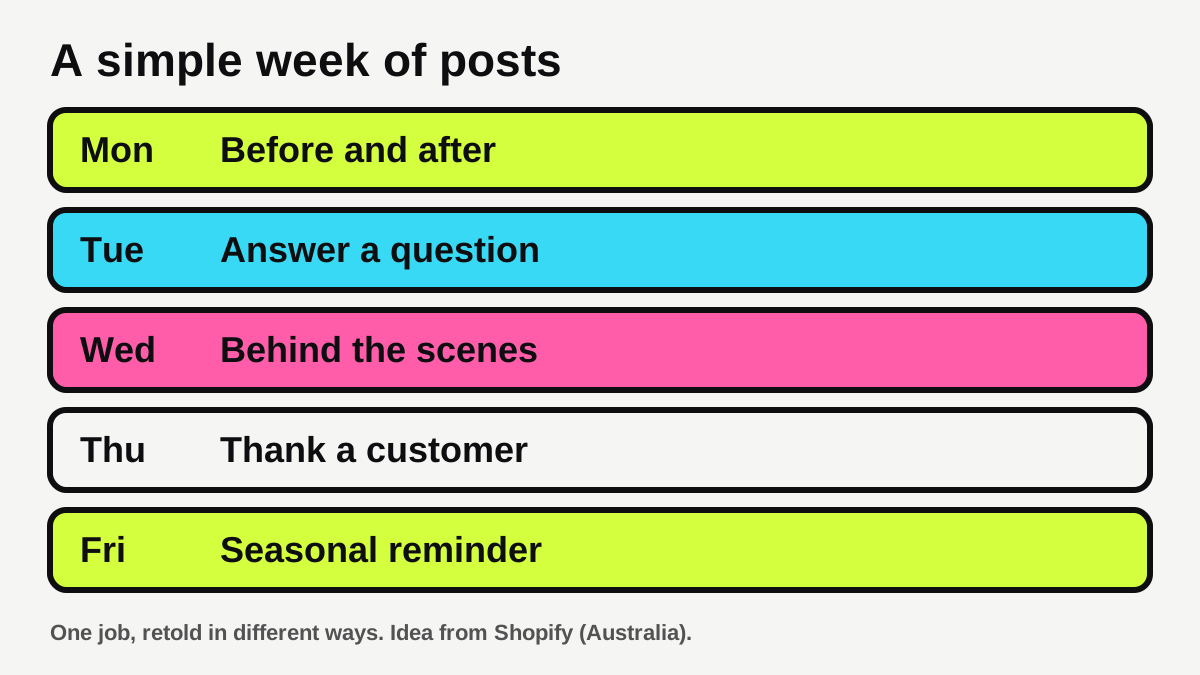
Here's how it works with a single job:
- Capture it once. Take photos and a short video while you're there. Ten minutes is plenty.
- Cut it three ways. A Reel of the transformation, a carousel with the steps, a single hero photo.
- Add a Story or two. A quick behind-the-scenes clip on the day.
- Write one caption. Say what you did, for whom (suburb is fine), and what a customer should do next. Shopify suggests budgeting time for captions along with creating and editing when you plan your calendar [2].
- Reuse the winner. Shopify's process: find your top-performing posts, change the format or write a new caption, and add them to your calendar [2].
Business Queensland recommends a posting schedule or content calendar [1]. If you'd rather not do it yourself, our content service can plan and produce posts for you.
What should you post in Instagram Stories?
Stories are the low-pressure option. Shopify says a good rule of thumb is at least one a day, but that Stories don't significantly increase your reach because they're mostly seen by people who already follow you. It describes them as more casual, less edited and easier to produce [2]. Business Queensland also lists stories among the platform features that increase interaction [1].
So use Stories for things that don't need to last:
- Today's special, a last-minute cancellation slot or a "we're open Saturday" note.
- A quick behind-the-scenes clip from a job.
- A tagged post from a customer, once they've agreed.
- A link to your booking page. Our free link page tool gives you one tidy page to point people at.
Treat Stories as a bonus. If you only have the energy for feed posts this week, that's fine.
Can you post photos of customers and their work?
Often yes, but ask first. Business Queensland says to tag customers or partners where appropriate, and to get permission before reposting others' content [1]. Shopify suggests sharing customer photos and tagged Stories, and encouraging customers to tag you, including a branded hashtag in your bio to make that easier [2].
On privacy, the OAIC says photos and videos of a person are personal information under the Privacy Act 1988 if their identity is clear or could reasonably be worked out [5]. The OAIC also says that if someone posts a photo of you without permission, you can ask them to remove it first [5]. Whether the Privacy Act applies to your particular business depends on its details, so treat this as general information and ask a lawyer if you're unsure. A simple habit protects you either way:
- Ask before you post a customer's face, home or car, and keep a message or note of the yes.
- Ask a parent or guardian when children appear.
- If someone asks you to take a post down, do it promptly.
- Keep clients' private details out of the frame, such as house numbers, documents and screens.
Reviews make good content too. Our guide to how to get more Google reviews covers how to ask for them, and the same permission habit applies when you share one on Instagram.
What should you leave out?
- Hard selling in every post. Business Queensland says to post things customers find interesting and avoid hard selling [1]. A good test: would this be worth watching if it came from a stranger?
- Anything that depends on Instagram alone. Business Queensland warns that accounts can be shut down without warning, and recommends building a website and email list rather than relying only on social media [1]. Link your site from your profile.
- Unanswered comments. Business Queensland says customers expect quick replies and that an automated reply with your contact details is better than none [1]. A fast reply to a comment or message is worth more than an extra post. See our guide on how fast to reply to new leads.
- Posting just to hit a number. Buffer says quality content always wins over volume [3].
How do you use hashtags and captions?
Keep it simple. Business Queensland suggests hashtags that help people find you, such as location names and business types [1]. That means your suburb and your trade, not a list of generic tags. Put the useful bit of the caption first, say what you want the person to do (call, book, message), and link to your website [1].
Shopify's tip for customers: add a branded hashtag to your bio so people can tag you [2].
How do you know what's working?
Business Queensland says to track who engages with your content, where they're located and how that engagement leads to sales, and to try a different approach if something isn't working [1]. Once a month, look at your last 10 to 15 posts and ask:
- Which got the most saves, shares and replies?
- Which brought a call, a booking or a message?
- What format were they in?
Then do more of that. Shopify says the same: find your top performers and create more like them [2].
What to do next
- Pick five post types from the table above that suit your business.
- Photograph your next job once, then cut it into a Reel, a carousel and a Story.
- Schedule a week of posts in one sitting. Aim for three to five feed posts [3].
- Add your suburb and trade as hashtags, and link your website or link page in your bio [1].
- Reply to comments and messages quickly [1].
- After a month, check your numbers and repeat what worked [1][2].
If you want to see how your business looks online today, run our free visibility scan. For the numbers behind posting rhythm, read how often a small business should post on social media.
Want this done for you every weekday?
The Content Engine writes, designs and posts in your voice.
Sources
- [1]Social media for business · Business Queensland (Queensland Government) · accessed 31 October 2026
- [2]How Often Should You Post on Instagram? 2026 Guide · Shopify (Australia) · accessed 31 October 2026
- [3]How Often to Post on Social Media in 2026: A Data-Backed Guide · Buffer · accessed 31 October 2026
- [4]Data Shows Instagram Reels are Best For Reach — But Not Engagement · Buffer · accessed 31 October 2026
- [5]Photos and videos · Office of the Australian Information Commissioner (OAIC) · accessed 31 October 2026