Small business automation ideas: 5 admin jobs to hand off
Small business automation ideas that save real hours: invoice reminders, booking reminders, instant replies, review requests and quote follow-ups, plus rules.
By the Omniwink team · 6 November 2026 · 8 min read
Listen to the summary· 2 min
The admin jobs worth automating first are the ones that repeat, follow a clear rule and cost you money when they slip. For most local businesses that means five things: invoice reminders, appointment reminders, instant replies to missed calls and enquiries, review requests and quote follow-ups. Each can run in the background once you set it up, so you stop doing the same chore by hand.
These small business automation ideas do not need you to be technical, and you do not need AI for most of it. This guide covers what each job involves, what to check first, the Australian rules on automatic messages, and how to tell it is working. It is general information, so check anything specific to your industry.
Why automate admin at all?
Because admin eats time you could spend earning or resting. A 2019 survey of more than 1,300 Australian small business leaders by accounting software company Reckon found many owners spent an average of 10 or more hours a week on administration and payroll [7]. Reckon also reported that admin and red tape cost small businesses an average of 541 hours and $14,857 a year [7]. It is an older survey from a software seller, so read the numbers as a sign of the problem and not a precise measure.
The same survey found that owners who set aside time for daily admin reported spending 17% less on admin and payroll [7]. That points to the real win: not heroic software, but a steady habit that a machine can keep for you on the days you are on a roof or with a customer.
What makes a good job to automate?
Look for tasks that are:
- Repeated every week, so the set-up effort pays back.
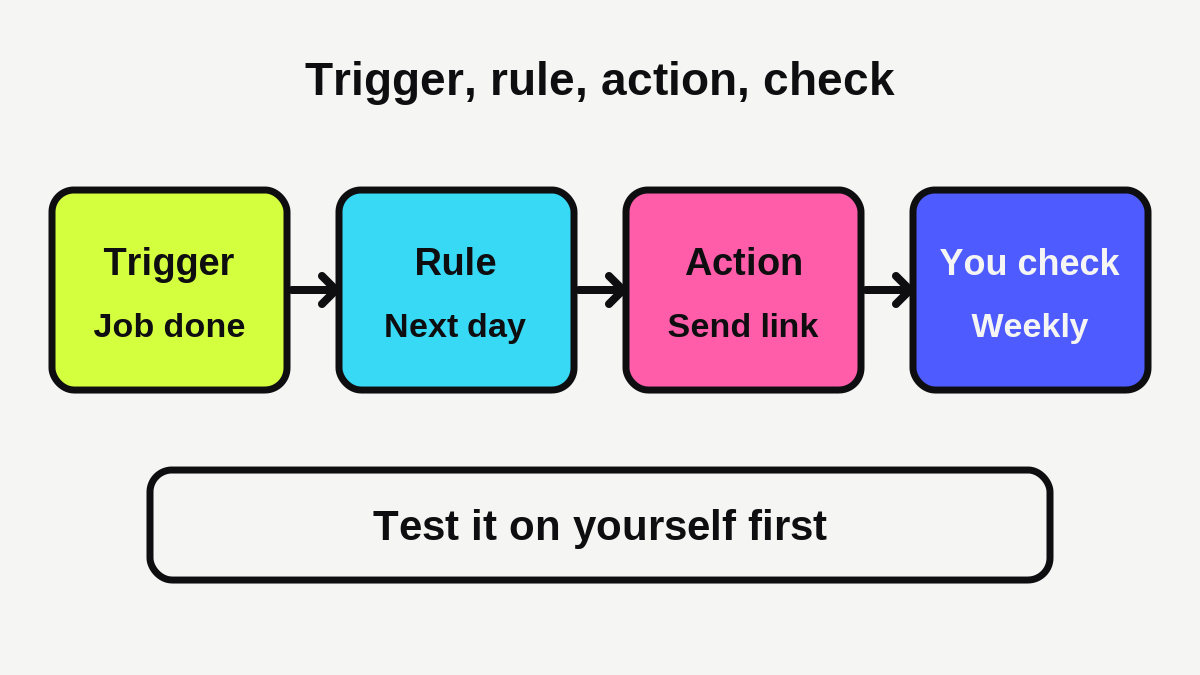
- Rule-based: you can say "when X happens, do Y" in one sentence.
- Costly to forget, such as a late invoice or a lost enquiry.
- Low-risk if the message is plain, so a mistake is not a disaster.
Which five small business automation ideas should you start with?
| Job | Trigger | What goes out | Main benefit |
|---|---|---|---|
| Invoice reminders | An invoice nears or passes its due date | Email with a pay link | Faster payment |
| Appointment reminders | A booking is made | Text or email before the time | Fewer no-shows |
| Instant replies | A missed call or web form | Short text or email | Fewer lost enquiries |
| Review requests | A job is completed | Message with your review link | More reviews |
| Quote follow-ups | A quote goes unanswered | A friendly nudge | More quotes answered |
How do you automate invoices and payment reminders?
Chasing money is the most draining admin job and the easiest to automate. Service NSW says automating invoicing can save time and reduce late payments, and that invoicing software can send automated email reminders and let customers click and pay directly from an invoice [1].
The scale of the problem is real. A 2017 Payment Times Reporting Inquiry, quoted by the Victorian Small Business Commission, surveyed 2,783 businesses and found that around half had more than 40% of their invoices paid late [2]. It is a few years old, but it shows late payment is common.
What can invoicing software do for you?
Xero's page lists three useful features [3]:
- Repeating invoices, for customers billed the same amount on a schedule, which it can create and send for you.
- Reminders sent before and after the due date, with timing you choose.
- Online payment options, and Xero says customers who use them "get paid up to twice as fast" [3]. That is the company's own claim, so test it in your business.
Xero is one example and other invoicing tools offer similar features. When we looked, Xero listed its Grow plan at $78 a month after an introductory offer [3], so ask any provider for the full price. See our website cost calculator for the same kind of thinking about other costs.
Make the reminders work harder
Software can only send what you set up, so the terms matter too:
- Service NSW suggests shorter payment terms such as 7 days where possible, and for project work asking for 50% up front and 50% on completion [1].
- The VSBC recommends electronic invoices to reduce errors, and says you should include the information the ATO requires on a tax invoice [2].
- If chasing does not work, the VSBC says early assistance is free and the matter can move to low-cost mediation [2].
How do you automate appointment reminders?
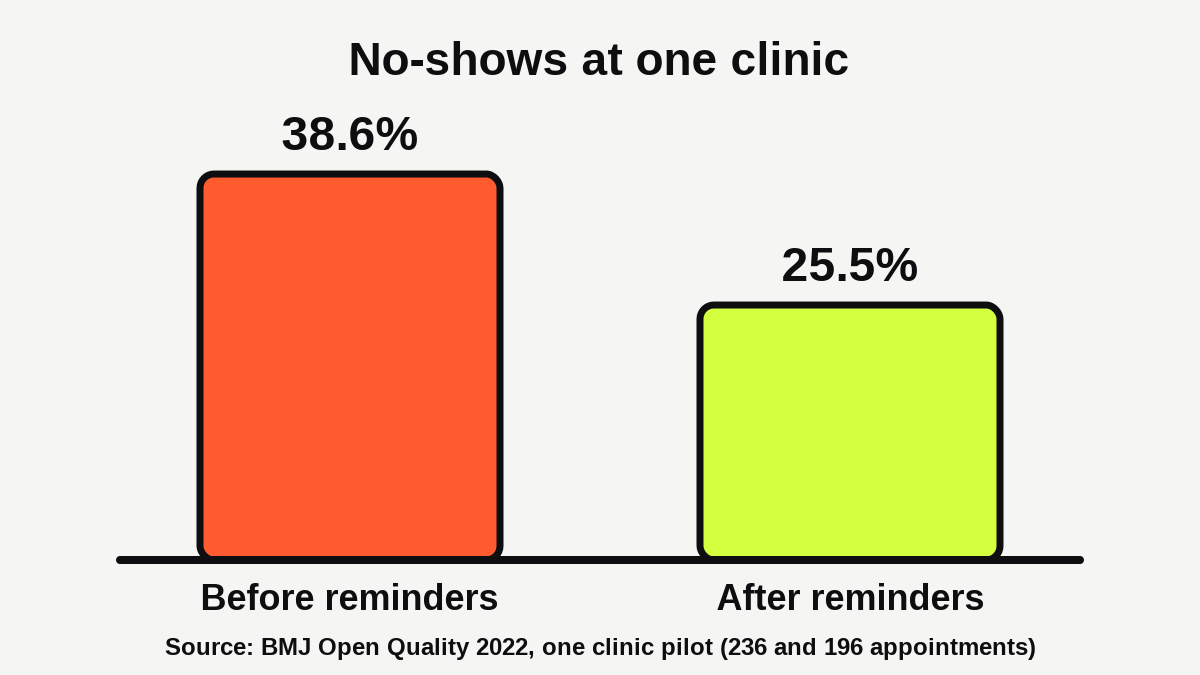
A reminder sent automatically after someone books costs you nothing in time and can stop a gap in your day. In a pilot study at a young adult haematology clinic, a single SMS reminder sent 48 hours before the appointment was linked with uninformed no-shows falling from 38.6% (91 of 236 appointments) to 25.5% (50 of 196) [4].
Be careful with that. It was one clinic, a pilot, and the comparison group came from earlier records and not a randomised trial, as the authors themselves note [4]. Your result may be smaller or larger, but a reminder is cheap to try.
Most online booking tools can do this for you. If you take bookings by phone, ask your booking or practice software whether it sends reminders. For salons, physios and dentists, this is often the quickest win on the list.
Health practices have extra duties around patient information and advertising, so keep reminders to the time, place and how to change the booking, and check your obligations with your professional body.
How do you automate replies to missed calls and new enquiries?
People who ring or fill in a form often contact two or three businesses at once, so the first reply tends to win. Our guide to missed call text back explains how an automatic text goes out within seconds of a call you could not take, and our guide to how fast to reply to a new lead sets a sensible target for every kind of enquiry.
Web forms are even simpler: set the form to send the customer a short confirmation saying who you are, when you will reply and what you may need from them. If you want something that answers the call itself, see what an AI receptionist costs in Australia.
What are the rules for automatic messages?
An automatic message is still a message. Business.gov.au says that by law you must have the customer's permission to send electronic messages, and defines a commercial message as one that offers, advertises or promotes a business, good or service [5]. Its page does not address plain service messages such as a booking confirmation, so if you are unsure which kind yours is, ask your provider or a lawyer.
If a message counts as marketing, business.gov.au says you must [5]:
- Keep a record of express consent: who gave it, when and how.
- Give a clear unsubscribe option that costs nothing and does not need a login.
- Remove people within 5 working days of a request.
- Keep the unsubscribe working for at least 30 days after sending.
The safest habit is one short, useful message tied to something the person just did.
How do you automate review requests?
Reviews help local customers choose you, but most happy customers never think to leave one. Google says you can remind customers to leave a review and ask them to visit a Google link or scan a QR code [6].
Automating it means a message with your review link goes out soon after each job is marked complete. Create your link with our free Google review link generator, then add it to the message you send when you finish a job. Our guide to how to get more Google reviews covers the rules, including what you must not offer in return.
Keep these requests to one per customer, and ask only people whose job went well. Do not tie any reward to a review.
How do you automate quote follow-ups?
Quotes go quiet because the customer got busy, not because they said no. A scheduled follow-up reminds you, or reminds them, a few days later. The simplest version is a reminder in your phone or customer list to check in on every open quote after a set number of days. Our guide to following up a quote without being pushy has wording you can copy.
A simple customer list, or a CRM, can hold the quote, the date and the next step in one place. We explain what that means in what is a CRM for small business.
How do you choose the tool?
Start with what you already pay for. Many accounting, booking and phone systems have reminders or follow-ups built in, and they are often switched off. Check those settings before buying anything new.
If you do add a tool, ask three questions: does it connect to the software you already use, what is the full monthly price including message charges, and can you see exactly what it sent and when? Keep a short log of what is switched on, so a message does not keep going out after your prices or opening hours change.
What should you not automate?
Some things need a person:
- Complaints and upset customers.
- Complex or unusual quotes, where price needs judgement.
- Sensitive conversations about health, money or legal matters.
- Anything you would be embarrassed for a customer to see sent twice.
Automate the routine message around the edges and keep the human conversation for yourself.
What to do next
- Pick one job from the table, the one that costs you most when it slips.
- Write the message in plain words, with who you are and one next step.
- Check the consent and unsubscribe rules if it could count as marketing [5].
- Test it by sending it to yourself before a real customer sees it.
- Check after a month: money received, no-shows, replies, reviews.
- Add the next job only once the first one works.
If you would like help setting up messages and follow-ups, see our automations service, or start with the free diagnostic to see where your enquiries leak. Plumbers and other trades often begin with instant replies and invoice reminders.
Hand the admin to an AI employee.
Custom automations for the jobs that eat your week, quoted before we start.
Sources
- [1]Tips for getting paid faster · Service NSW (NSW Government) · accessed 6 November 2026
- [2]Getting paid on time · Victorian Small Business Commission · accessed 6 November 2026
- [3]Invoicing Software for Australia · Xero · accessed 6 November 2026
- [4]Increasing clinical attendance among adolescents and young adults: a simple and novel method · BMJ Open Quality (2022) · accessed 6 November 2026
- [5]Promoting your business by email or text messages · business.gov.au (Australian Government) · accessed 6 November 2026
- [6]Tips to get more reviews · Google Business Profile Help · accessed 6 November 2026
- [7]Admin 'killing the dream' of Australian Small Businesses · Reckon (press release, 1 May 2019) · accessed 6 November 2026