Is Google Ads worth it for a local business in Australia?
Is Google Ads worth it for a local business? How the auction and costs work, the sums to run first, and how to start small without a runaway bill.
By the Omniwink team · 14 November 2026 · 9 min read
Listen to the summary· 2 min

Google Ads can be worth it for a local business in Australia, but only when one sum works: what you pay to win a job has to be less than what that job earns you. Google charges per click, not per customer, so the answer depends on how many clicks it takes to get a call, and how many calls it takes to win a job.
The honest answer to is Google Ads worth it for a local business is "it depends on your numbers, not on Google". Urgent, higher-value work with a website and phone ready to convert tends to suit it. Low-margin work, or a business that can't answer the phone, usually doesn't. This guide shows how the costs work, the sums to run first, and how to start small without a nasty bill.
How does Google Ads actually charge you?
Google Ads is pay-per-click advertising. You pay when someone clicks your ad, not when they see it. When you set a bid, you are telling Google "the maximum amount you're willing to pay for a click on your ad" [1]. Google says that how much you actually pay "is often less" [1].
Every time someone searches, Google runs an auction to decide which ads appear and in what order, and it runs different auctions for each ad location [1]. A bigger bid does not win automatically. Google says there are six main factors that decide when and if your ad appears, including your bid, the quality of your ad and landing page (which Google summarises as Quality Score), the context of the search and how competitive the auction is [1].
For a small business, that has two practical meanings:
- Competition is part of your price. How competitive the auction is counts as one of the six factors [1], so you don't set your price alone.
- Your website is part of the price. The page the click lands on is part of how Google judges your ad [1]. A weak page can make clicks cost more and convert less. Our guide to what makes a local business website get enquiries covers what that page needs.
What will a click cost you?
Nobody can give you an honest single number for Australia, because it varies by trade, suburb and time of year. The best place to check is Google's own Keyword Planner, which shows forecasts for the searches you pick. It describes average cost per click as "the average amount you might pay for a click", and notes that the amount you are actually charged can be lower [4].
Treat those numbers as a guide. Google calls the figures approximations, averaged from about a week of data, and says results are less reliable for small geographic areas and for new accounts [4]. Check a few searches, like "emergency plumber" with your suburb, and use the figure as a rough budget input, not a promise.
What sums should you run before you spend anything?
Work backwards from a job, not forwards from a budget. You need three numbers.
- Cost per click. Use Keyword Planner to get a rough figure [4].
- Click to enquiry rate. Out of every 100 people who click, how many call or send a form? You won't know this until you test, so start with a cautious guess.
- Enquiry to job rate. Out of every 10 enquiries, how many become paid work? You probably know this one already from your quotes.
Multiply them out and you get a cost per job. Compare that to what a job earns you in profit.
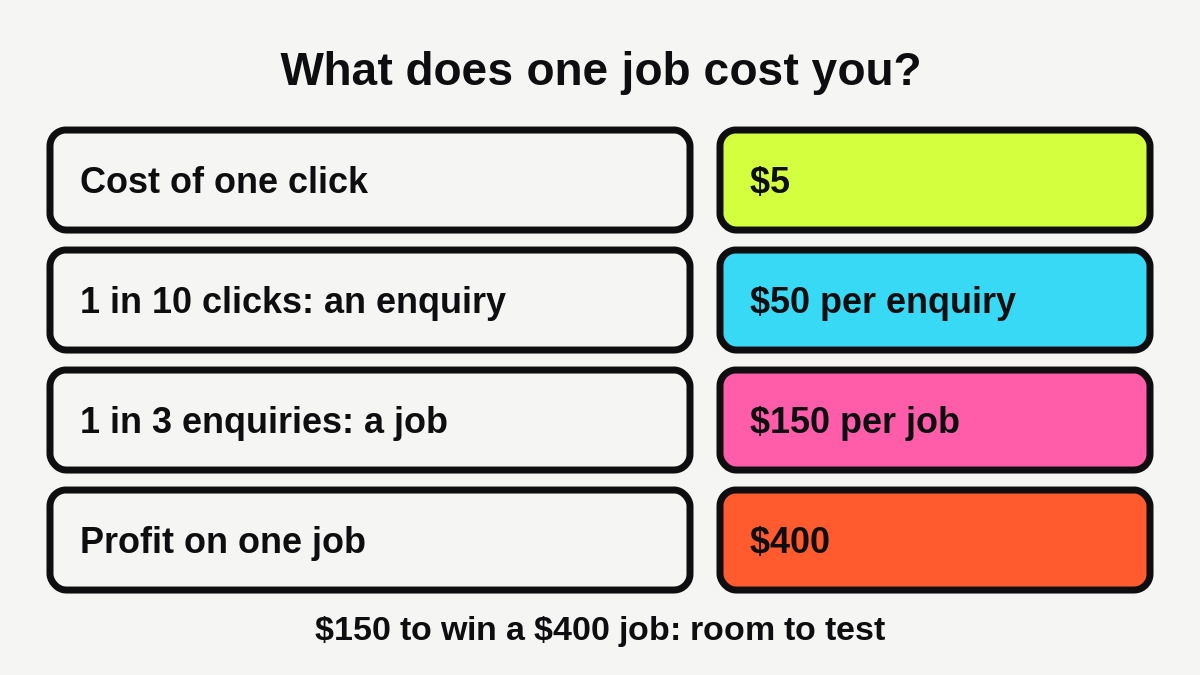
The example above uses invented figures, so don't treat them as a benchmark. They show the method. If your own cost to win a job is close to or above what the job earns, ads will lose you money however well they are run. If it is well below, you have room to test.
What counts as one job worth?
Use profit, not the invoice total. And think about repeat work: a customer who comes back for years is worth more than their first job. Our guide to what a customer is worth shows how to work out that number, which is the ceiling on what you can afford to pay to win someone.
Which local businesses suit Google Ads, and which don't?
Search ads reach people at the moment they are looking. That suits some businesses much more than others.
| Business type | Why it can suit | Watch out for |
|---|---|---|
| Emergency trades (plumbers, electricians, locksmiths) | People search when something is wrong and need someone now | You must answer the phone fast, and costs vary by suburb |
| Higher-value jobs (builders, landscapers, renovators) | One job covers a lot of clicks | Long decisions, so track enquiries over weeks |
| Clinics and dentists | New patients search by treatment and suburb | Health advertising rules apply, so keep claims general |
| Salons, cafes and gyms | Can promote a new opening or offer | Low profit per visit, so sums are tight |
| Cleaners and detailers | Steady local searches | Thin margins and lots of price shoppers |
Your own plumbers or electricians page may show how that trade is searched, and our other industry pages do the same for other trades and local services.
The honest rule: the lower your profit per customer, the harder ads are to justify. If a customer is worth $40 to you once, paying $30 to win them won't work.
Google Ads, Google Business Profile or SEO: which comes first?
For most local businesses, free and cheaper things come first. A complete, well-reviewed Google Business Profile and a clear website cost little and keep working. Our guide to ranking in Google Maps for your suburb covers the free side, and local SEO for tradies puts the steps in order.
Ads are different in one important way: they stop the moment you stop paying. Organic work builds up over time, but takes weeks or months to show. So many businesses do both: fix the free basics first, then use a small ad budget to get calls sooner while the slower work builds. Our guide to how much a small business should spend on marketing can help you decide where ads sit in your overall budget.
How do you stop wasting money on the wrong clicks?
Most wasted spend comes from three things: showing to the wrong people, matching the wrong searches and not knowing what happened. Each has a fix.
Show ads only to people in your area
By default, Google's location setting reaches "people in, regularly in or who've shown interest in your included locations" [2]. If you only serve your own suburbs, you can change this to the Presence option, which limits ads to people in or regularly in your targeted locations [2]. Google also suggests adding local place names to your ad text, which helps filter out people who aren't in your area [2].
Block searches you don't want
Negative keywords let you exclude search terms, so your ads focus on the queries that matter to your business [5]. A plumber might exclude "course" or "jobs". Google warns that using too many negative keywords can reduce reach, and that negatives don't block close variants [5]. Check the search terms report each week and add the irrelevant ones.
Count calls, not just clicks
For most local businesses, the phone is the goal. Google can count a call as a conversion by analysing call recordings or by counting calls that last longer than a minimum duration you set [3]. Set a minimum call length that filters out accidental taps. Without call tracking, you will see clicks and cost but not know which ones led to work. If you can't answer the phone, our guide to missed call text back explains how to catch those enquiries, and lead response time shows why speed matters.
How do you keep the budget under control?
You set an average daily budget, but Google can spend more on a single day. For most campaigns, the daily spending limit is two times your average daily budget, and the monthly limit is 30.4 times the average daily budget [6].
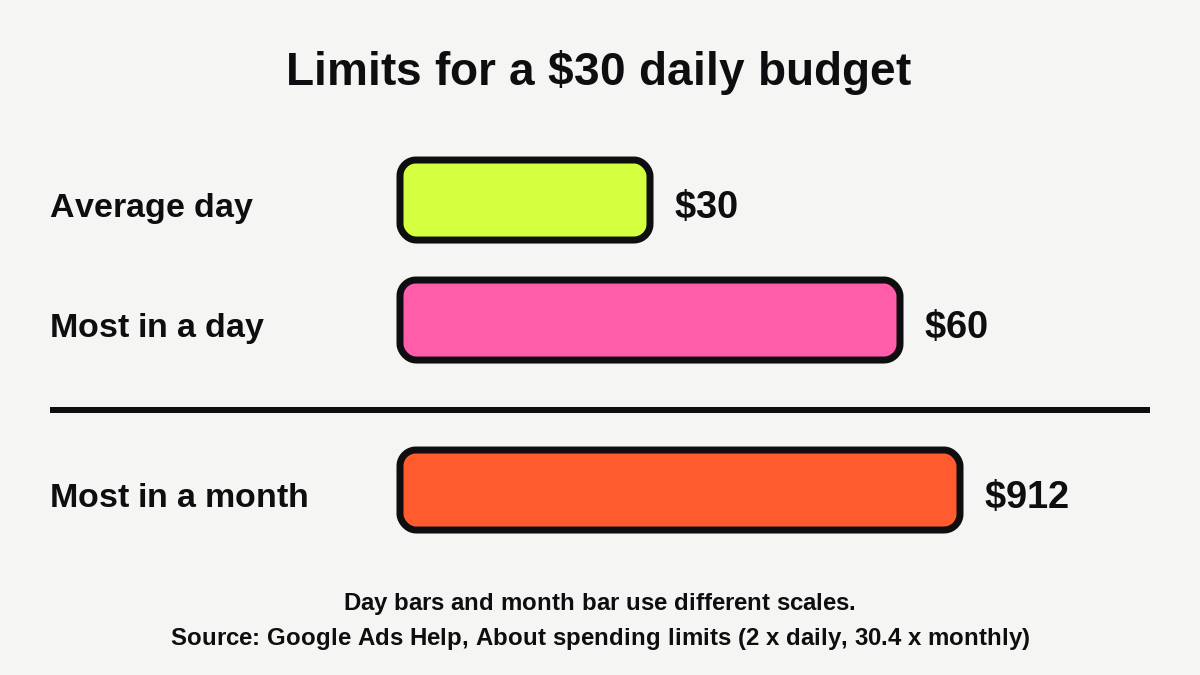
So a $30 average daily budget means up to $60 on any single day and up to $912 in a month (30.4 times $30) [6]. That is not a mistake, it's how the limits work. Set your budget with that ceiling in mind, and check your spend weekly for the first month.
How much should you start with?
Start with an amount you could lose without harm. It should be enough to get a meaningful number of clicks, but small enough that you can stop easily. Use Keyword Planner to see roughly how many clicks a daily budget buys for your searches [4], and decide in advance how long the test runs.
What are the rules for what your ads can say?
Ads are advertising, so Australian consumer law applies. The ACCC says "any statement that creates a false impression about goods and services can be breaking the law", and that a business "must be able to prove any claim they advertise" [7]. It also says that in some circumstances failing to disclose information can be misleading, and gives the example of an ad that says "free" while an extra payment sits in the fine print [7].
In practice: don't say "cheapest in town" or "same-day service" unless you can prove it, and show prices that include everything the customer will pay. Our guide to advertising rules for small business in Australia goes through the rules in more detail.
Should you manage Google Ads yourself or hire someone?
Both work. Doing it yourself costs time and carries the risk of an expensive learning curve. A good provider should show you your cost per enquiry, not just clicks and impressions, and should let you see and own the account. Our guide to agency, freelancer or DIY covers how to choose. If you'd like help, our growth service covers paid search for local businesses, and you can see all prices on our pricing page.
What to do next
- Work out your profit per job and what a customer is worth over time.
- Use Keyword Planner to check forecast costs for two or three searches in your suburbs [4].
- Run the sums: cost per click, click to enquiry, enquiry to job.
- Check that your website page and Google Business Profile are ready. A free Omniwink scan shows how they look to a customer.
- If the sums work, start with a small daily budget and remember the limits are two times daily and 30.4 times monthly [6].
- Set the location option to Presence, add negative keywords and track calls [2][3][5].
- Review enquiries and jobs won after your test period, then decide to stop, change or grow.
Stop losing jobs to missed calls.
Growth Systems texts back missed calls, answers messages and asks for reviews, on its own.
Sources
- [1]How the Google Ads auction works - Google Ads Help · Google · accessed 14 November 2026
- [2]Prevent clicks outside of your geo-targeted locations · Google Ads Help · accessed 14 November 2026
- [3]Measure calls from ads - Google Ads Help · Google · accessed 14 November 2026
- [4]About Keyword Planner forecasts · Google Ads Help · accessed 14 November 2026
- [5]About negative keywords - Google Ads Help · Google · accessed 14 November 2026
- [6]About spending limits - Google Ads Help · Google · accessed 14 November 2026
- [7]False or misleading claims · Australian Competition and Consumer Commission (ACCC) · accessed 14 November 2026