Link in bio: what to put on yours as a local business
Not sure what to put in your link in bio? Here is what a local business should link to, in what order, how to word it and how to see what gets tapped.
By the Omniwink team · 1 November 2026 · 10 min read
Listen to the summary· 1 min
Your link in bio should send people to the one thing you most want them to do next: call you, book, ask for a quote or leave a review. For most local businesses that means a short list of big buttons, with the action first, not a link to everything you have ever made.
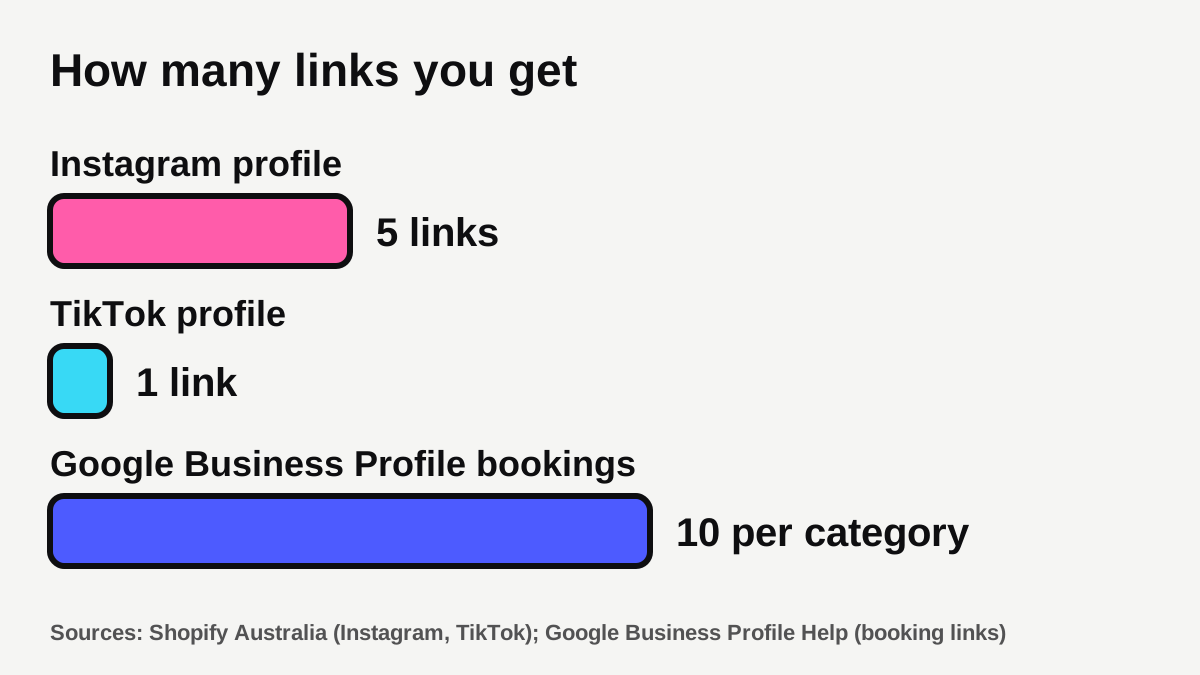
Instagram lets you add up to five links to your profile, and TikTok gives you one [1][2]. That is not much space, so the order and the wording matter more than the count. This guide covers what to put in your link in bio, which buttons to put first, whether you need a link-in-bio tool at all, and how to see what people actually tap.
If you're still working out what to post to get people looking at your profile in the first place, start with our guide to what to post on Instagram as a local business.
What should you put in your link in bio?
Think of the link as the doorway between "I like this post" and "I'd like to deal with this business". Business Queensland describes your business profile as your hub or landing page, where customers find you and information about your business [3]. The bio link is how people get from that hub to the place where something happens.
Start with the question a stranger has when they land on your profile: "Can this business do the job, and how do I get in touch?" Then put the answer one tap away. A good link in bio for a business usually offers some of these:
- Book or enquire. Your booking page or quote form. This is the main one for most businesses.
- Call. A button that opens the phone's dialler.
- Reviews. Your Google review page, so happy customers can find it. Our free Google review link generator makes the link, and our guide on how to get more Google reviews covers when to ask.
- Your website. Business Queensland's checklist says to make sure your website address is listed on your profiles, and suggests the full URL for consistency [3].
- One current offer or news item. A seasonal special, a new service or a booking-open message. Swap it when it ends.
- Where to find you. A map link or opening hours for shopfront businesses.
That's six ideas, and you only need the first few. The test for every button is simple: would a customer on their phone, in a hurry, want to tap this?
How many links can you have, and does it matter?
Instagram supports up to five external links on a profile. It announced this in April 2023, for all accounts including business and creator accounts [1]. Shopify says that, as of 2026, you can include five links in your Instagram bio and one link on TikTok [2].
Google Business Profile works differently. It lets you add up to 10 booking links per category, which show on your profile in Google Search and Maps [6]. That is a different place with a different job, but it's a useful comparison: a Google profile is for people already searching for you, while your Instagram bio is for people who found you through a post.
Does having five links mean you should use all five? Not necessarily. Five links in the Instagram field can work, but they're easy to overlook if only the first is obvious to a visitor. A single page with a few well-labelled buttons often gives you more control than five loose links, because you can reorder and relabel the buttons without editing your profile each time. Shopify's guidance is to use a link-in-bio page to share several calls to action on one mobile-friendly page [2].
Which buttons should come first?
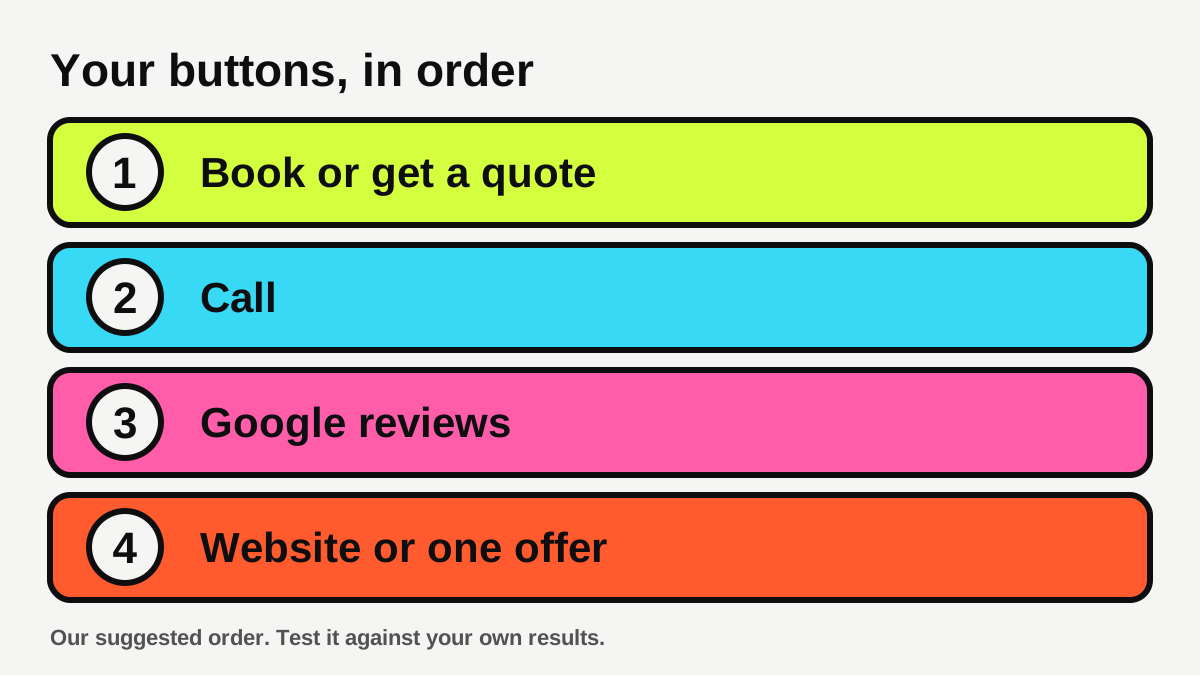
Put the action you most want at the top, and make the rest earn their place. Here's a simple order for different kinds of local business. It's our suggestion, not a rule, so test it against your own results.
| Business | Button 1 | Button 2 | Button 3 | Button 4 |
|---|---|---|---|---|
| Tradie (plumber, electrician, builder) | Get a quote | Call now | Our recent work | Google reviews |
| Salon or clinic | Book online | Call or message | Price list or services | Google reviews |
| Cafe or restaurant | Menu | Book a table or order | Find us and hours | Today's special |
| Gym or studio | Book a class or free trial | Timetable | Membership options | Google reviews |
| Accountant, broker or agent | Book a call | Free guide or checklist | Our services | Google reviews |
For a few trades you can see more detail on our pages for plumbers, salons and cafes.
Health and finance businesses should keep the page to general information. Clinics should follow AHPRA's advertising rules, which include no testimonials about clinical care and no promised outcomes. If you're unsure, check your profession's rules before you publish.
Do you need a link-in-bio tool, or can you link to your website?
Not always. Shopify notes that you don't necessarily need a link-in-bio tool, because a responsive website theme lets you link straight to your homepage instead [2]. That can work well if your homepage already shows a clear call button, a booking or quote form and your reviews. Our guide on what pages a tradie website needs covers what to include if yours doesn't yet.
A link-in-bio page is useful when:
- You want several different actions, such as book, quote, call and review, in one place.
- Your website is slow or hard to use on a phone.
- You want to change the buttons often, for example for a seasonal offer.
- You want simple counts of which buttons get tapped.
Shopify lists the features worth looking for in these tools: shopping tools, lead capture forms such as newsletter sign-ups, embeds for videos or social posts, QR code generators, analytics showing page visits and clicks per link, and a drag-and-drop editor [2]. For a local business the ones that matter most are usually a quick-loading page, a call button, a booking or quote link and basic click counts.
| Option | Good for | Watch out for |
|---|---|---|
| Link straight to your website | Businesses with a fast, clear mobile site | Visitors may have to hunt for the action you want |
| Free link-in-bio tool | Several buttons in one tidy page, quick to set up | Branding badges, limits on buttons or analytics |
| Paid link-in-bio tool | Extra features like shop embeds and email capture | A monthly cost for features you may not use |
| A page on your own website | Full control, your own domain | Needs a website you can edit, or someone to do it |
Our free link page tool is one option: it builds a hosted page for you with call, quote and review buttons and shows you how many people tap each. If you're comparing it with Linktree, we explain the differences on our Linktree alternative page. If you'd rather have the page on your own domain, that's part of what a business website can include.
One thing to keep in mind about any third-party page: when you rely on a service you don't control, your page lives where they host it. Check how you can export or replace your links if you ever switch tools.
How should you word the buttons?
Say what happens when someone taps. Google's guidance on link text is about web pages, but the principle carries over: good link text is descriptive, concise and makes sense on its own, and generic words like "click here" or "read more" are best avoided [4]. On a phone, in an Instagram bio, that means labels like these:
- "Get a free quote" instead of "Click here"
- "Book a haircut" instead of "Bookings"
- "Call Sam on 0400 000 000" instead of "Contact"
- "Leave a Google review" instead of "Feedback"
- "See the menu" instead of "Learn more"
Keep each label to a handful of words so it doesn't get cut off, and keep the order the same as your bio text. If your bio says "Book below", the first button should be the booking one.
A few more habits help:
- Match the post. If your latest post is about a bathroom renovation, your first button might be "Get a bathroom quote", not a generic enquiry page.
- Use plain words. Business Queensland advises avoiding hard selling and encouraging conversation and visits to your website [3]. A friendly label does this better than a pushy one.
- Keep the first screen tidy. On a phone, only a few buttons are visible without scrolling, so don't hide your main action below the fold.
- Test it on your own phone. Open your profile as a stranger would, tap each link and check it opens fast, shows what you promised and has no broken page.
How do you see which links people actually tap?
If you don't measure it, you're guessing. There are two simple ways.
Use the counts your tool gives you. Many link-in-bio tools show visits and clicks per link [2]. Look once a month and drop any button that nobody taps.
Add a tag to your link so Google Analytics can see where visitors came from. Google Analytics Help explains that adding UTM campaign parameters to a link shows which campaigns refer traffic, with the values appearing in the Traffic acquisition report. It recommends always using utm_source, utm_medium and utm_campaign, and says parameter values are case sensitive, so utm_source=google is treated differently from utm_source=Google [5]. For example, a link to your quote page from Instagram might end with:
?utm_source=instagram&utm_medium=social&utm_campaign=bio-link
Keep your tags in lower case and use the same words every time, or your reports will split into confusing duplicates. Missing parameters can also show up as "(not set)" in your reports, so set all three [5].
Counts only tell you what people tapped. The real test is whether it led to a call, a booking or a quote. Ask new customers how they found you, and note down the answer. Our guide on how fast to reply to new leads is worth a read, because the best link in the world doesn't help if enquiries sit unanswered.
What are the common mistakes?
- Too many choices. Eight buttons are not better than four. A visitor who has to think often leaves.
- Linking to a home page that buries the action. If your homepage has no phone number or quote form near the top, send people to the page that does.
- Outdated links. An expired offer or a broken booking page costs you enquiries. Check every link when you post about a new offer.
- A link that doesn't work on a phone. Many people will tap your bio link from a phone. Test it on your own, on mobile data, not only your office wifi.
- No full website address anywhere else. Business Queensland suggests listing your website address on each profile, so don't rely on the bio link alone [3].
- Forgetting your other profiles. If you have a Google profile, keep its website and booking links up to date too. Our Google Business Profile checklist covers it.
- Links that look suspicious. Meta says links in bios are scanned for compliance with its Community Guidelines and Terms of Service [1]. Use a clean, recognisable web address you control or trust, and don't use shortened links that hide where they lead.
What to do next
- Choose your one main action: book, call, get a quote or leave a review.
- Write down your top four buttons in order, using the table above as a starting point.
- Decide whether you need a tool, or whether your website can do the job. A link page takes a couple of minutes if you want one.
- Word each button plainly, so a stranger knows what happens when they tap [4].
- Add lower-case UTM tags to your Instagram link so you can see the visits in Google Analytics [5].
- Test every button on your own phone.
- In a month, look at the counts, drop any button nobody taps and update your offer.
If you'd like help with the posts that send people to your link, our content service can plan and produce them for you, or you can start with our free social post ideas tool.
Want this done for you every weekday?
The Content Engine writes, designs and posts in your voice.
Sources
- [1]Instagram takes on Linktree and others with support for up to 5 links in bio · TechCrunch · accessed 1 November 2026
- [2]6 Link-in-Bio Tools for Instagram and TikTok (2026) · Shopify Australia · accessed 1 November 2026
- [3]Social media for business · Business Queensland (Queensland Government) · accessed 1 November 2026
- [4]Link best practices for Google Search · Google Search Central · accessed 1 November 2026
- [5]URL builders: Collect campaign data with custom URLs · Google Analytics Help · accessed 1 November 2026
- [6]Manage your local business links · Google Business Profile Help · accessed 1 November 2026